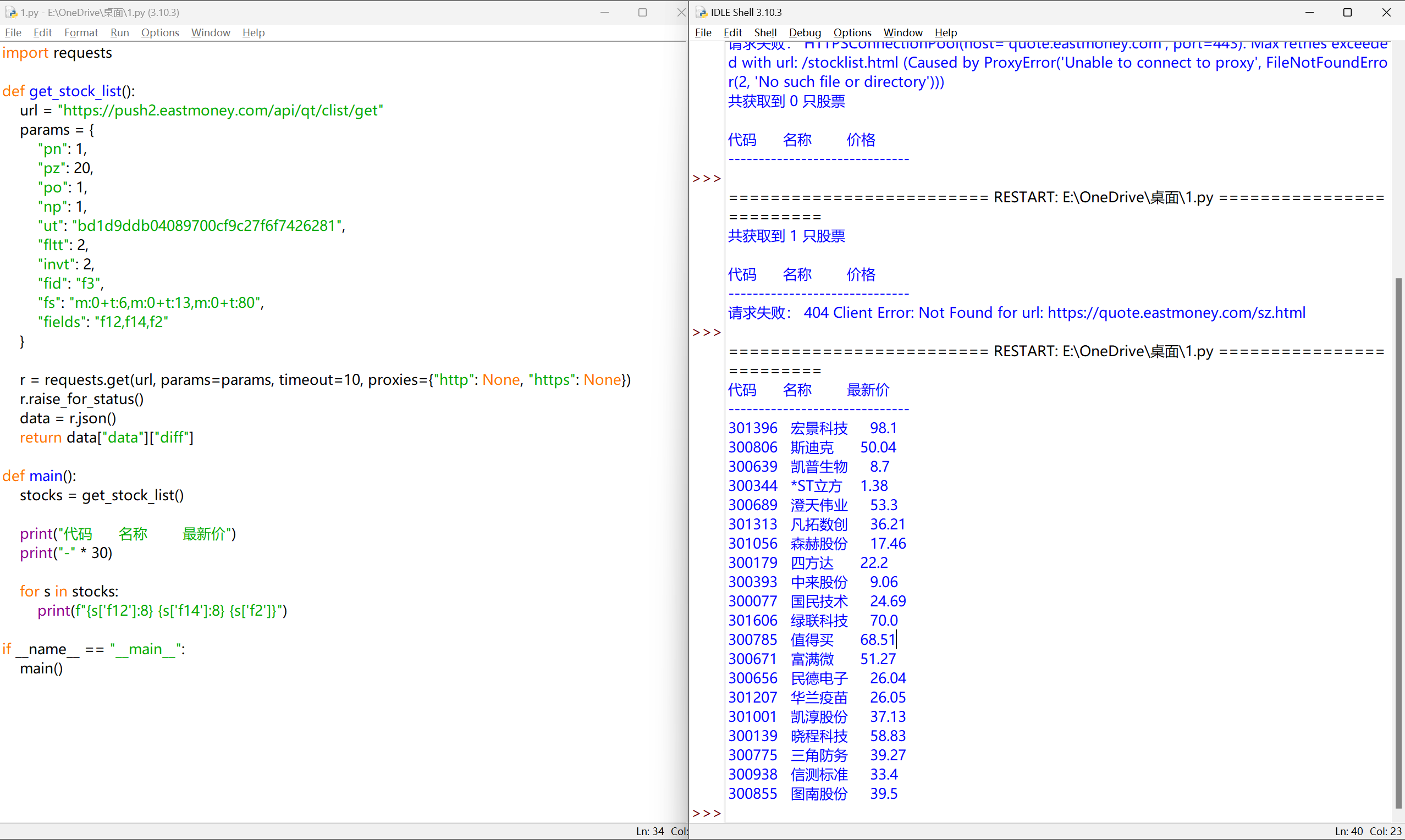
正则表达式

regular expression, regex, RE

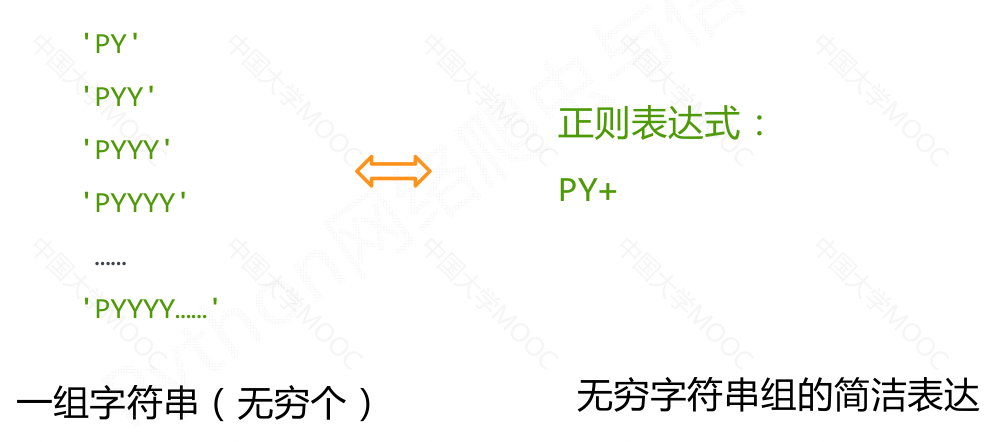
正则表达式是用来简洁表达一组字符串的表达式

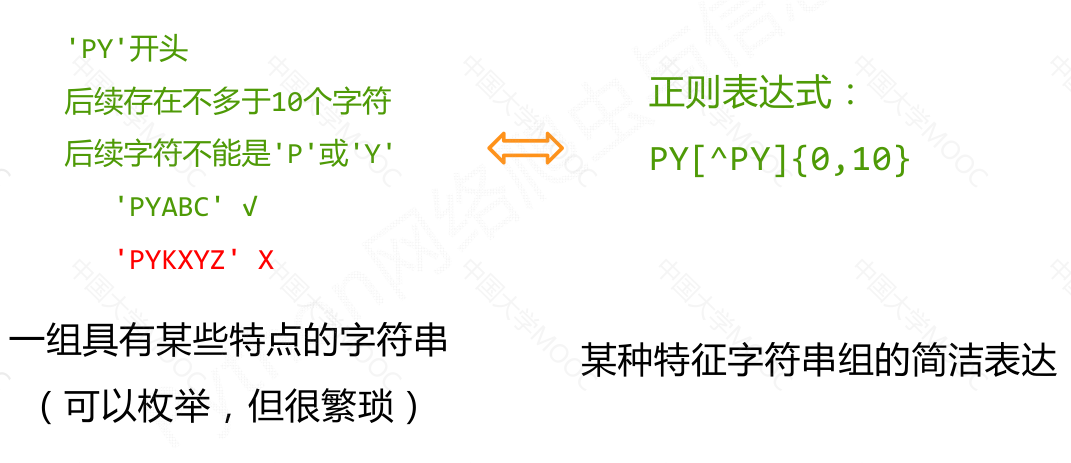
正则表达式是一种针对字符串表达“简洁”和“特征”思想的工具

正则表达式可以用来判断某字符串的特征归属
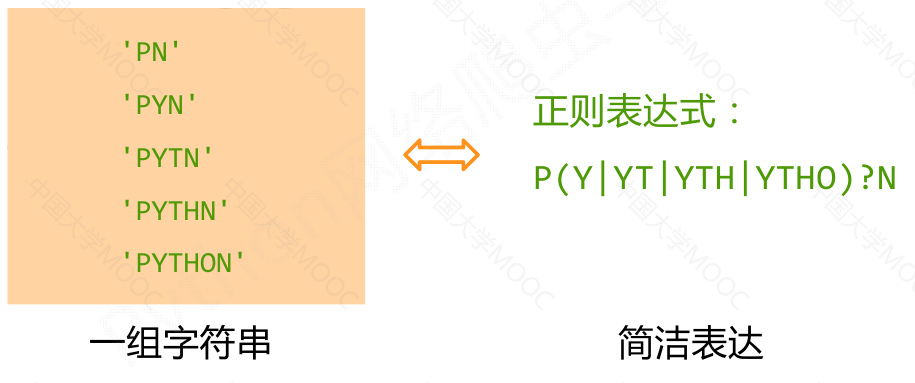
最主要应用在字符串匹配中

正则表达式的使用
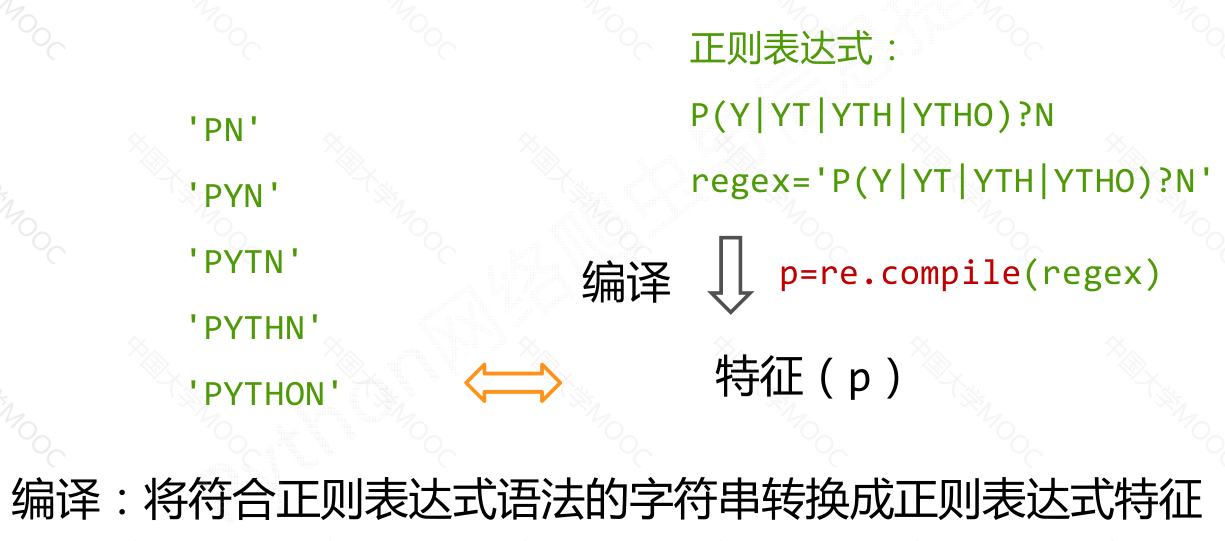
正则表达式的语法

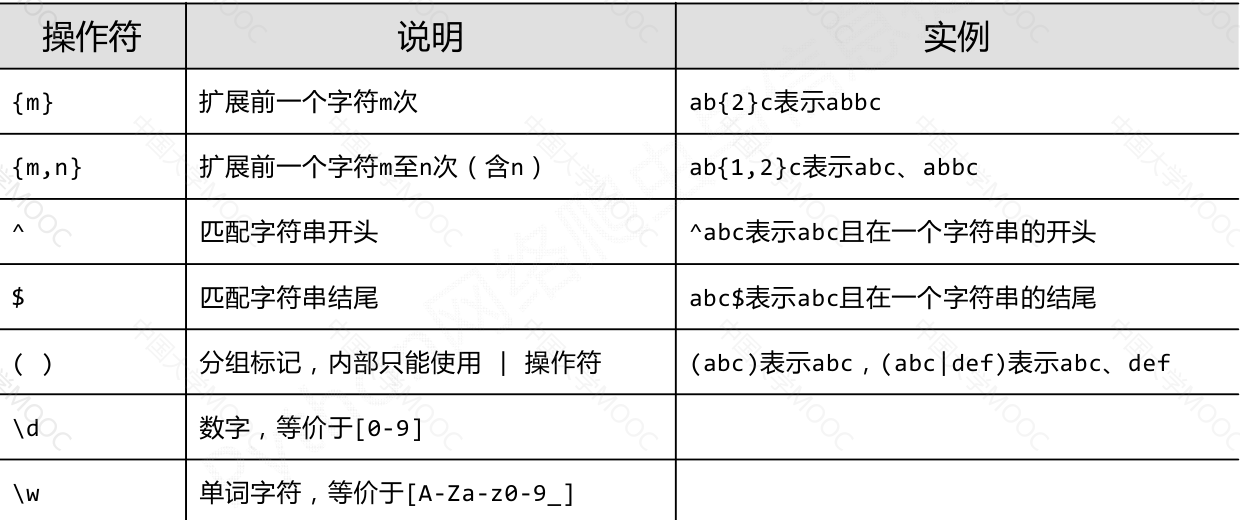
正则表达式语法由字符和操作符构成

正则表达式的常用操作符
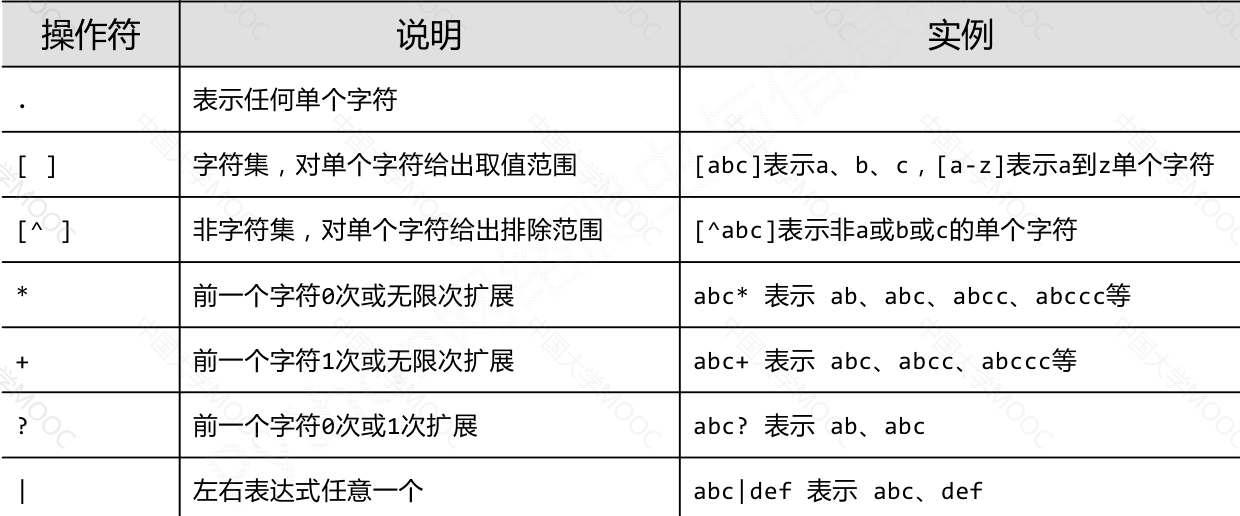
实例

由26个字母组成的字符串 ^[A-Za-z]+$

由26个字母和数字组成的字符串 ^[A-Za-z0-9]=$

整数形式的字符串 ^-?\d=$

正整数形式的字符串 ^[0-9]*[1-9][0-9]*$

中国境内邮政编码,6位 [1-9]\d{5}

匹配中文字符 [\u4e00-\u9fa5]

国内电话号码,010‐68913536 \d{3}-\d{8}|\d{4}-\d{7}

匹配 IP 地址的正则表达式:

IP地址字符串形式的正则表达式(IP地址分4段,每段0‐255)

\d+.\d+.\d+.\d+ 或 \d{1,3}.\d{1,3}.\d{1,3}.\d{1,3}

精确写法

0‐99: [1‐9]?\d

100‐199: 1\d{2}

200‐249: 2[0‐4]\d

250‐255: 25[0‐5]

(([1‐9]?\d|1\d{2}|2[0‐4]\d|25[0‐5]).){3}([1‐9]?\d|1\d{2}|2[0‐4]\d|25[0‐5])

Re 库的基本使用

Re 库是 Python 的标准库,主要用于字符串匹配

调用方式:

import re

正则表达式的表示类型

raw string类型(原生字符串类型)

re 库采用 raw string 类型表示正则表达式,表示为:r'text'

例如:

r'[1‐9]\d{5}'

r'\d{3}‐\d{8}|\d{4}‐\d{7}'

raw string 是不包含对转义符再次转义的字符串

re 库也可以采用 string 类型表示正则表达式,但更繁琐

例如:

'[1‐9]\\d{5}'

'\\d{3}‐\\d{8}|\\d{4}‐\\d{7}'

建议:当正则表达式包含转义符时,使用 raw string

Re 库主要功能函数
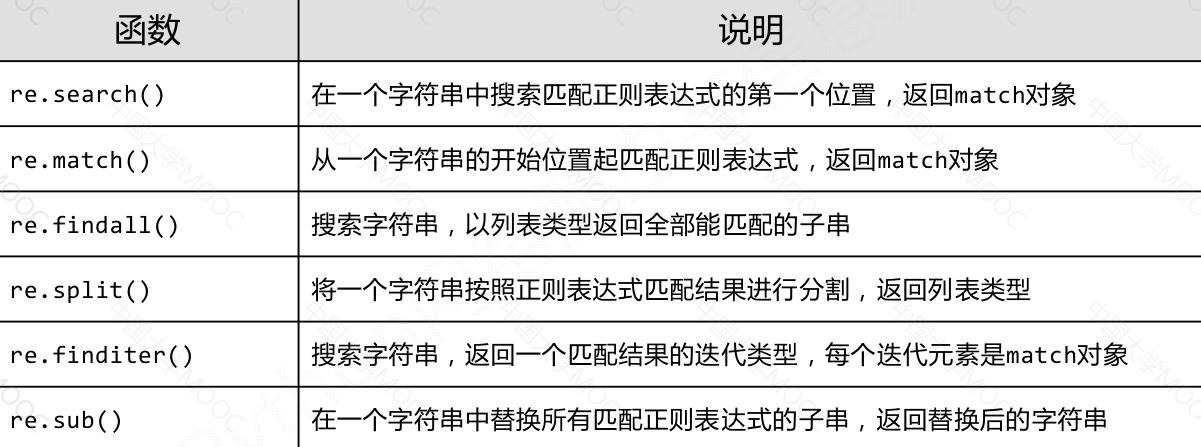
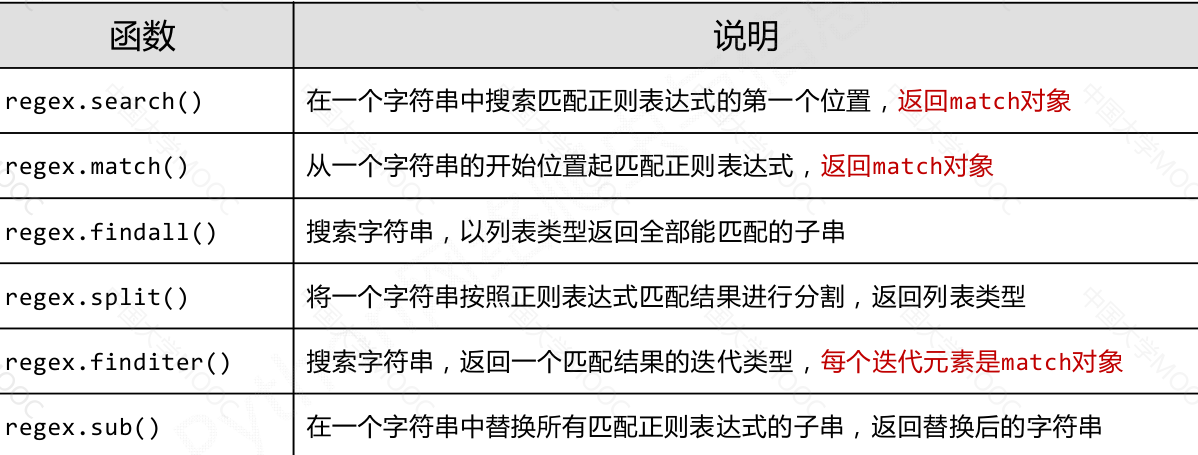
re.search(pattern, string, flags=0)

在一个字符串中搜索匹配正则表达式的第一个位置

返回match对象

  • pattern : 正则表达式的字符串或原生字符串表示
  • string : 待匹配字符串
  • flags : 正则表达式使用时的控制标记

python
1
2
3
4
5
6
7
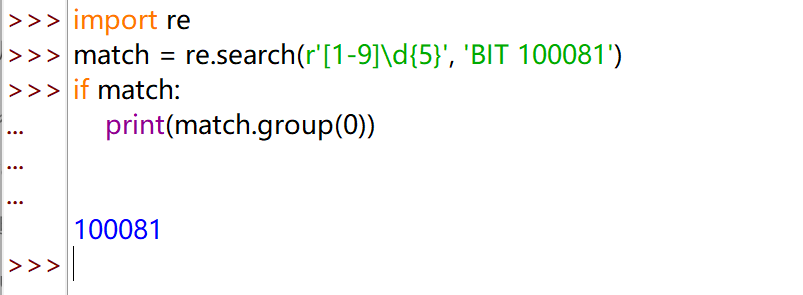
import re
match = re.search(r'[1-9]\d{5}', 'BIT 100081')
if match:
    print(match.group(0))

    
100081

re.match(pattern, string, flags=0)

从一个字符串的开始位置起匹配正则表达式

返回match对象

  • pattern : 正则表达式的字符串或原生字符串表示
  • string : 待匹配字符串
  • flags : 正则表达式使用时的控制标记
python
 1
 2
 3
 4
 5
 6
 7
 8
 9
10
11
12
13
14
15
16
17
18
19
import re
match = re.match(r'[1-9]\d{5}', 'BIT 100081')
if match:
    match.group(0)


match.group(0)
Traceback (most recent call last):
  File "<pyshell#27>", line 1, in <module>
    match.group(0)
AttributeError: 'NoneType' object has no attribute 'group'

match = re.match(r'[1-9]\d{5}', '100081 BIT')
if match:
    match.group(0)

    
'100081'

re.findall(pattern, string, flags=0)

搜索字符串,以列表类型返回全部能匹配的子串

  • pattern : 正则表达式的字符串或原生字符串表示
  • string : 待匹配字符串
  • flags : 正则表达式使用时的控制标记
python
1
2
3
4
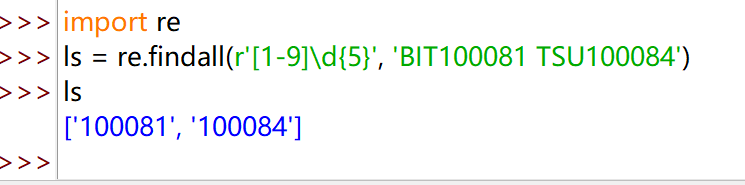
import re
ls = re.findall(r'[1-9]\d{5}', 'BIT100081 TSU100084')
ls
['100081', '100084']

re.split(pattern, string, maxsplit=0, flags=0)

将一个字符串按照正则表达式匹配结果进行分割返回列表类型pattern : 正则表达式的字符串或原生字符串表示

  • string : 待匹配字符串
  • maxsplit: 最大分割数,剩余部分作为最后一个元素输出
  • flags : 正则表达式使用时的控制标记
python
1
2
3
4
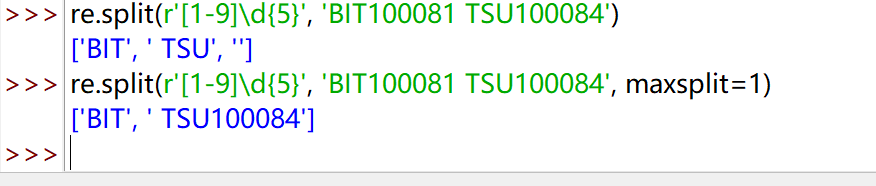
re.split(r'[1-9]\d{5}', 'BIT100081 TSU100084')
['BIT', ' TSU', '']
re.split(r'[1-9]\d{5}', 'BIT100081 TSU100084', maxsplit=1)
['BIT', ' TSU100084']

re.finditer(pattern, string, flags=0)

搜索字符串,返回一个匹配结果的迭代类型,每个迭代元素是match对象

  • pattern : 正则表达式的字符串或原生字符串表示
  • string : 待匹配字符串
  • flags : 正则表达式使用时的控制标记
python
1
2
3
4
5
6
7
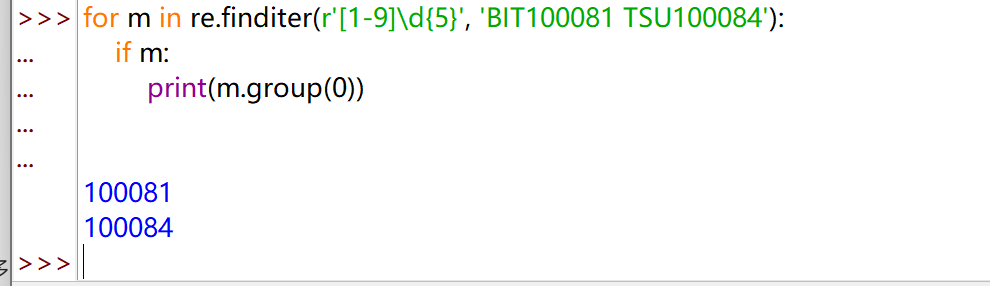
for m in re.finditer(r'[1-9]\d{5}', 'BIT100081 TSU100084'):
    if m:
        print(m.group(0))

        
100081
100084

re.sub(pattern, repl, string, count=0, flags=0)

在一个字符串中替换所有匹配正则表达式的子串返回替换后的字符串

  • pattern : 正则表达式的字符串或原生字符串表示
  • repl : 替换匹配字符串的字符串
  • string : 待匹配字符串
  • count : 匹配的最大替换次数
  • flags : 正则表达式使用时的控制标记
python
1
2
3
re.sub(r'[1-9]\d{5}', ':zipcode', 'BIT100081 TSU100084')
                       
'BIT:zipcode TSU:zipcode'

Re 库的另一种等价用法

函数式用法:一次性操作

python
1
rst = re.search(r'[1-9]\d{5}', 'BIT 100081')

面向对象用法:编译后的多次操作

python
1
2
pat = re.compile(r'[1-9]\d{5}')
rst = pat.search('BIT 100081')

regex = re.compile(pattern, flags=0)

将正则表达式的字符串形式编译成正则表达式对象

  • pattern : 正则表达式的字符串或原生字符串表示
  • flags : 正则表达式使用时的控制标记
python
1
regex = re.compile(r'[1‐9]\d{5}')

Re 库的 Match 对象

Match 对象介绍

Match对象是一次匹配的结果,包含匹配的很多信息

python
 1
 2
 3
 4
 5
 6
 7
 8
 9
10
match = re.search(r'[1-9]\d{5}', 'BIT 100081')
                       
if match:
       print(match.group(0))

                       
100081
type(match)
                       
<class 're.Match'>

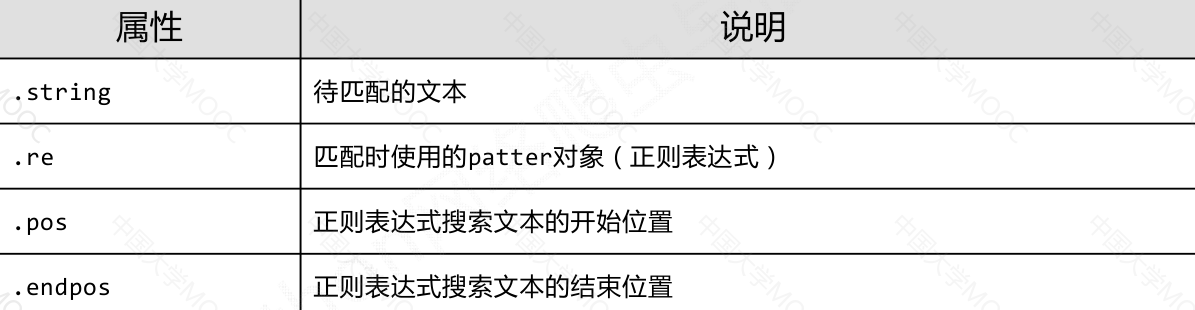
Match 对象的属性

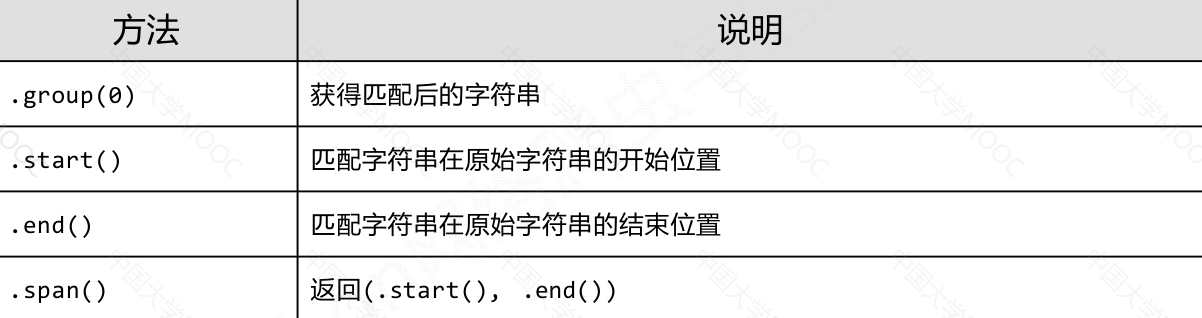
Match 对象的方法

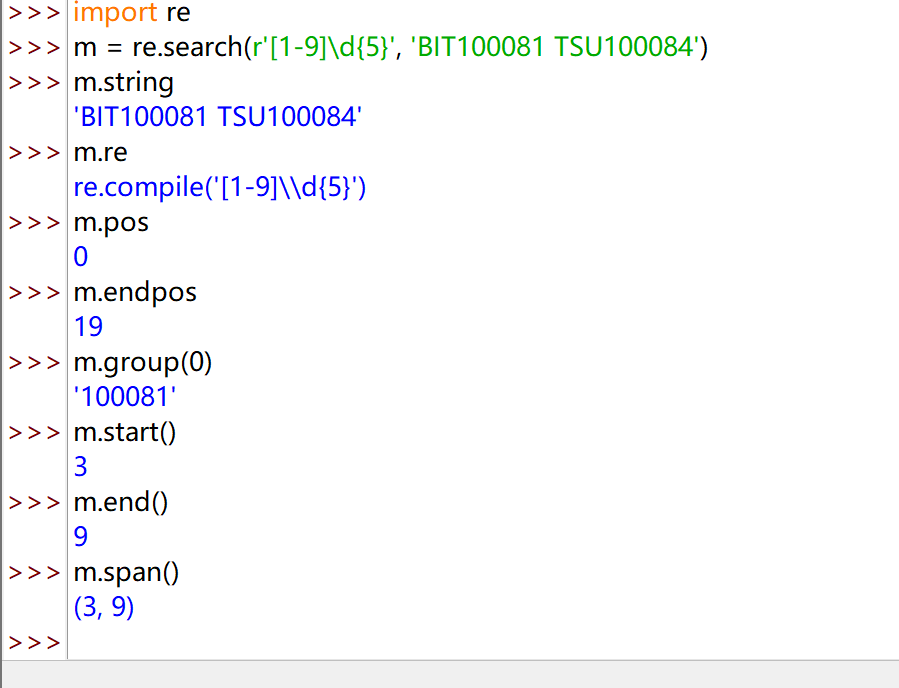
实例

python
 1
 2
 3
 4
 5
 6
 7
 8
 9
10
11
12
13
14
15
16
17
18
import re
m = re.search(r'[1-9]\d{5}', 'BIT100081 TSU100084')
m.string
'BIT100081 TSU100084'
m.re
re.compile('[1-9]\\d{5}')
m.pos
0
m.endpos
19
m.group(0)
'100081'
m.start()
3
m.end()
9
m.span()
(3, 9)

Re 库的贪婪匹配和最小匹配

贪婪匹配

python
1
2
3
match = re.search(r'PY.*N', 'PYANBNCNDN')
match.group(0)
'PYANBNCNDN'

Re库默认采用贪婪匹配,即输出匹配最长的子串

最小匹配

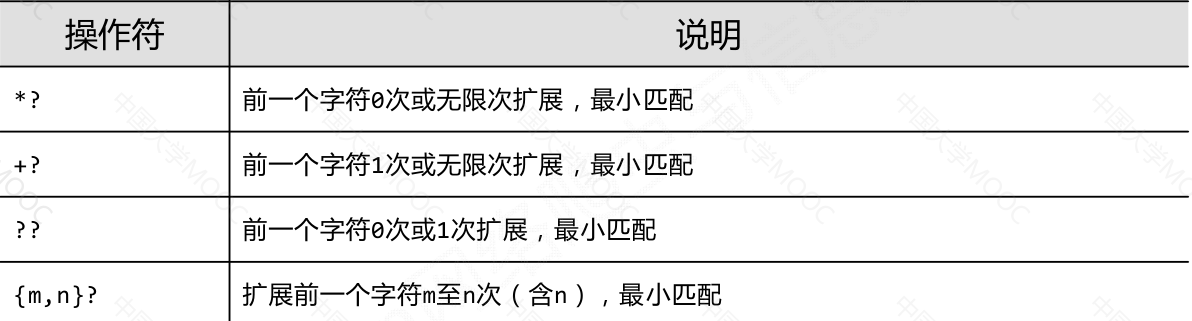
只要长度输出可能不同的,都可以通过在操作符后增加?变成最小匹配

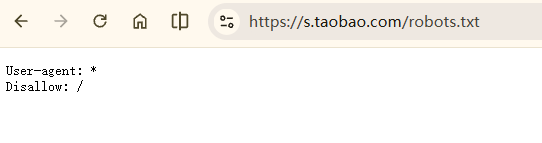
实例 2:“淘宝商品信息商品定向爬虫”

功能描述

目标:获取淘宝搜索页面的信息,提取其中的商品名称和价格

理解:

淘宝的搜索接口

翻页的处理

搜索“书包”:

第一页:

[https://uland.taobao.com/sem/tbsearch?bc_fl_src=tbsite_T9W2LtnM&channelSrp=bingSomama&clk1=0129be48f7a3f3b6ae74387bcc1ce3d9&commend=all&ie=utf8&initiative_id=tbindexz_20170306&keyword=%E4%B9%A6%E5%8C%85&localImgKey=&msclkid=aaf53d2af2ba11560246545262a66325&<font style="color:#DF2A3F;">page=1</font>&preLoadOrigin=https%3A%2F%2Fwww.taobao.com&q=%E4%B9%A6%E5%8C%85&refpid=mm_2898300158_3078300397_115665800437&search_type=item&sourceId=tb.index&spm=tbpc.pc_sem_alimama%2Fa.search_manual.0&ssid=s5-e&tab=all](https://uland.taobao.com/sem/tbsearch?bc_fl_src=tbsite_T9W2LtnM&channelSrp=bingSomama&clk1=0129be48f7a3f3b6ae74387bcc1ce3d9&commend=all&ie=utf8&initiative_id=tbindexz_20170306&keyword=%E4%B9%A6%E5%8C%85&localImgKey=&msclkid=aaf53d2af2ba11560246545262a66325&page=1&preLoadOrigin=https%3A%2F%2Fwww.taobao.com&q=%E4%B9%A6%E5%8C%85&refpid=mm_2898300158_3078300397_115665800437&search_type=item&sourceId=tb.index&spm=tbpc.pc_sem_alimama%2Fa.search_manual.0&ssid=s5-e&tab=all)
下一页:

[https://uland.taobao.com/sem/tbsearch?bc_fl_src=tbsite_T9W2LtnM&channelSrp=bingSomama&clk1=0129be48f7a3f3b6ae74387bcc1ce3d9&commend=all&ie=utf8&initiative_id=tbindexz_20170306&keyword=%E4%B9%A6%E5%8C%85&localImgKey=&msclkid=aaf53d2af2ba11560246545262a66325&<font style="color:#DF2A3F;">page=2</font>&preLoadOrigin=https%3A%2F%2Fwww.taobao.com&q=%E4%B9%A6%E5%8C%85&refpid=mm_2898300158_3078300397_115665800437&search_type=item&sourceId=tb.index&spm=tbpc.pc_sem_alimama%2Fa.search_manual.0&ssid=s5-e&tab=all](https://uland.taobao.com/sem/tbsearch?bc_fl_src=tbsite_T9W2LtnM&channelSrp=bingSomama&clk1=0129be48f7a3f3b6ae74387bcc1ce3d9&commend=all&ie=utf8&initiative_id=tbindexz_20170306&keyword=%E4%B9%A6%E5%8C%85&localImgKey=&msclkid=aaf53d2af2ba11560246545262a66325&page=2&preLoadOrigin=https%3A%2F%2Fwww.taobao.com&q=%E4%B9%A6%E5%8C%85&refpid=mm_2898300158_3078300397_115665800437&search_type=item&sourceId=tb.index&spm=tbpc.pc_sem_alimama%2Fa.search_manual.0&ssid=s5-e&tab=all)

下一页:

[https://uland.taobao.com/sem/tbsearch?bc_fl_src=tbsite_T9W2LtnM&channelSrp=bingSomama&clk1=0129be48f7a3f3b6ae74387bcc1ce3d9&commend=all&ie=utf8&initiative_id=tbindexz_20170306&keyword=%E4%B9%A6%E5%8C%85&localImgKey=&msclkid=aaf53d2af2ba11560246545262a66325&<font style="color:#DF2A3F;">page=3</font>&preLoadOrigin=https%3A%2F%2Fwww.taobao.com&q=%E4%B9%A6%E5%8C%85&refpid=mm_2898300158_3078300397_115665800437&search_type=item&sourceId=tb.index&spm=tbpc.pc_sem_alimama%2Fa.search_manual.0&ssid=s5-e&tab=all](https://uland.taobao.com/sem/tbsearch?bc_fl_src=tbsite_T9W2LtnM&channelSrp=bingSomama&clk1=0129be48f7a3f3b6ae74387bcc1ce3d9&commend=all&ie=utf8&initiative_id=tbindexz_20170306&keyword=%E4%B9%A6%E5%8C%85&localImgKey=&msclkid=aaf53d2af2ba11560246545262a66325&page=3&preLoadOrigin=https%3A%2F%2Fwww.taobao.com&q=%E4%B9%A6%E5%8C%85&refpid=mm_2898300158_3078300397_115665800437&search_type=item&sourceId=tb.index&spm=tbpc.pc_sem_alimama%2Fa.search_manual.0&ssid=s5-e&tab=all)

程序的结构设计

步骤1:提交商品搜索请求,循环获取页面

步骤2:对于每个页面,提取商品名称和价格信息

步骤3:将信息输出到屏幕上

实例编写

python
 1
 2
 3
 4
 5
 6
 7
 8
 9
10
11
12
13
14
15
16
17
18
19
20
21
22
23
24
25
26
27
28
29
30
31
32
33
34
35
36
37
38
39
40
41
42
43
44
45
46
47
#CrowTaobaoPrice.py
import requests
import re

def getHTMLText(url):
    try:
        r = requests.get(url, timeout=30)
        r.raise_for_status()
        r.encoding = r.apparent_encoding
        return r.text
    except:
        return ""
    
def parsePage(ilt, html):
    try:
        plt = re.findall(r'\"view_price\"\:\"[\d\.]*\"',html)
        tlt = re.findall(r'\"raw_title\"\:\".*?\"',html)
        for i in range(len(plt)):
            price = eval(plt[i].split(':')[1])
            title = eval(tlt[i].split(':')[1])
            ilt.append([price , title])
    except:
        print("")

def printGoodsList(ilt):
    tplt = "{:4}\t{:8}\t{:16}"
    print(tplt.format("序号", "价格", "商品名称"))
    count = 0
    for g in ilt:
        count = count + 1
        print(tplt.format(count, g[0], g[1]))
        
def main():
    goods = '书包'
    depth = 3
    start_url = 'https://s.taobao.com/search?q=' + goods
    infoList = []
    for i in range(depth):
        try:
            url = start_url + '&s=' + str(44*i)
            html = getHTMLText(url)
            parsePage(infoList, html)
        except:
            continue
    printGoodsList(infoList)
    
main()

注:

由于淘宝搜索页面采用 JavaScript 动态加载并设置了反爬机制,使用 requests 获取到的 HTML 页面中不包含商品价格和标题等关键信息。

实例 3:股票数据定向爬虫

功能描述

目标:获取上交所和深交所所有股票的名称和交易信息

输出:保存到文件中

候选数据网站的选择

新浪股票:http://finance.sina.com.cn/stock/

百度股票:https://gupiao.baidu.com/stock/

选取原则:股票信息静态存在于HTML页面中,非js代码生成,没有Robots协议限制

选取方法:浏览器 F12,源代码查看等

选取心态:不要纠结于某个网站,多找信息源尝试

数据网站的确定

获取股票列表:

东方财富网:http://quote.eastmoney.com/stocklist.html

获取个股信息:

百度股票:https://gupiao.baidu.com/stock/

单个股票:https://gupiao.baidu.com/stock/sz002439.html

程序的结构设计

步骤1:从东方财富网获取股票列表

步骤2:根据股票列表逐个到百度股票获取个股信息

步骤3:将结果存储到文件

实例编写

python
 1
 2
 3
 4
 5
 6
 7
 8
 9
10
11
12
13
14
15
16
17
18
19
20
21
22
23
24
25
26
27
28
29
30
31
32
33
34
35
36
37
38
39
40
41
42
43
44
45
46
47
48
49
50
51
52
53
54
55
56
57
58
59
60
61
62
63
64
65
66
#CrawBaiduStocksB.py
import requests
from bs4 import BeautifulSoup
import traceback
import re

def getHTMLText(url, code="utf-8"):
    try:
        r = requests.get(url)
        r.raise_for_status()
        r.encoding = code
        return r.text
    except:
        return ""

def getStockList(lst, stockURL):
    html = getHTMLText(stockURL, "GB2312")
    soup = BeautifulSoup(html, 'html.parser') 
    a = soup.find_all('a')
    for i in a:
        try:
            href = i.attrs['href']
            lst.append(re.findall(r"[s][hz]\d{6}", href)[0])
        except:
            continue

def getStockInfo(lst, stockURL, fpath):
    count = 0
    for stock in lst:
        url = stockURL + stock + ".html"
        html = getHTMLText(url)
        try:
            if html=="":
                continue
            infoDict = {}
            soup = BeautifulSoup(html, 'html.parser')
            stockInfo = soup.find('div',attrs={'class':'stock-bets'})

            name = stockInfo.find_all(attrs={'class':'bets-name'})[0]
            infoDict.update({'股票名称': name.text.split()[0]})
            
            keyList = stockInfo.find_all('dt')
            valueList = stockInfo.find_all('dd')
            for i in range(len(keyList)):
                key = keyList[i].text
                val = valueList[i].text
                infoDict[key] = val
            
            with open(fpath, 'a', encoding='utf-8') as f:
                f.write( str(infoDict) + '\n' )
                count = count + 1
                print("\r当前进度: {:.2f}%".format(count*100/len(lst)),end="")
        except:
            count = count + 1
            print("\r当前进度: {:.2f}%".format(count*100/len(lst)),end="")
            continue

def main():
    stock_list_url = 'http://quote.eastmoney.com/stocklist.html'
    stock_info_url = 'https://gupiao.baidu.com/stock/'
    output_file = 'D:/BaiduStockInfo.txt'
    slist=[]
    getStockList(slist, stock_list_url)
    getStockInfo(slist, stock_info_url, output_file)

main()
python
 1
 2
 3
 4
 5
 6
 7
 8
 9
10
11
12
13
14
15
16
17
18
19
20
21
22
23
24
25
26
27
28
29
30
31
32
33
34
35
36
37
38
39
40
41
42
43
44
45
46
47
48
49
50
51
52
53
54
55
56
57
58
59
60
61
62
63
64
65
66
import requests

def get_stock_list():
    # 东方财富股票列表接口(返回 JSON 数据)
    url = "https://push2.eastmoney.com/api/qt/clist/get"

    # 接口参数(核心就在这里)
    params = {
        "pn": 1,      # page number:页码(从 1 开始)
        "pz": 20,     # page size:每页返回多少条数据
        "po": 1,      # 排序方式:1 表示倒序
        "np": 1,      # 是否分页(一般固定为 1)
        "ut": "bd1d9ddb04089700cf9c27f6f7426281",  # 用户标识(东方财富接口固定值)
        "fltt": 2,    # 返回数据格式控制(2 表示返回 float)
        "invt": 2,    # 返回字段类型控制
        "fid": "f3",  # 排序字段(f3 通常表示涨跌幅)
        # fs:股票市场范围
        # m:0  深市
        # t:6  创业板
        # t:13 中小板
        # t:80 科创板
        "fs": "m:0+t:6,m:0+t:13,m:0+t:80",
        # fields:指定返回哪些字段
        # f12:股票代码
        # f14:股票名称
        # f2 :最新价
        "fields": "f12,f14,f2"
    }

    # 发送 GET 请求
    # proxies 设置为 None 是为了避免本地代理干扰
    r = requests.get(
        url,
        params=params,
        timeout=10,
        proxies={"http": None, "https": None}
    )

    # 如果 HTTP 状态码不是 200,直接抛异常
    r.raise_for_status()

    # 将返回的 JSON 文本解析为 Python 字典
    data = r.json()

    # 返回股票列表(diff 是一个列表,每个元素是一只股票)
    return data["data"]["diff"]


def main():
    # 获取股票数据列表
    stocks = get_stock_list()

    # 打印表头
    print("代码      名称        最新价")
    print("-" * 30)

    # 遍历股票列表并打印
    for s in stocks:
        # s 是一个字典,如:
        # {'f12': '300750', 'f14': '宁德时代', 'f2': 210.35}
        print(f"{s['f12']:8} {s['f14']:8} {s['f2']}")


# Python 程序入口
if __name__ == "__main__":
    main()