第三方库 wordcloud

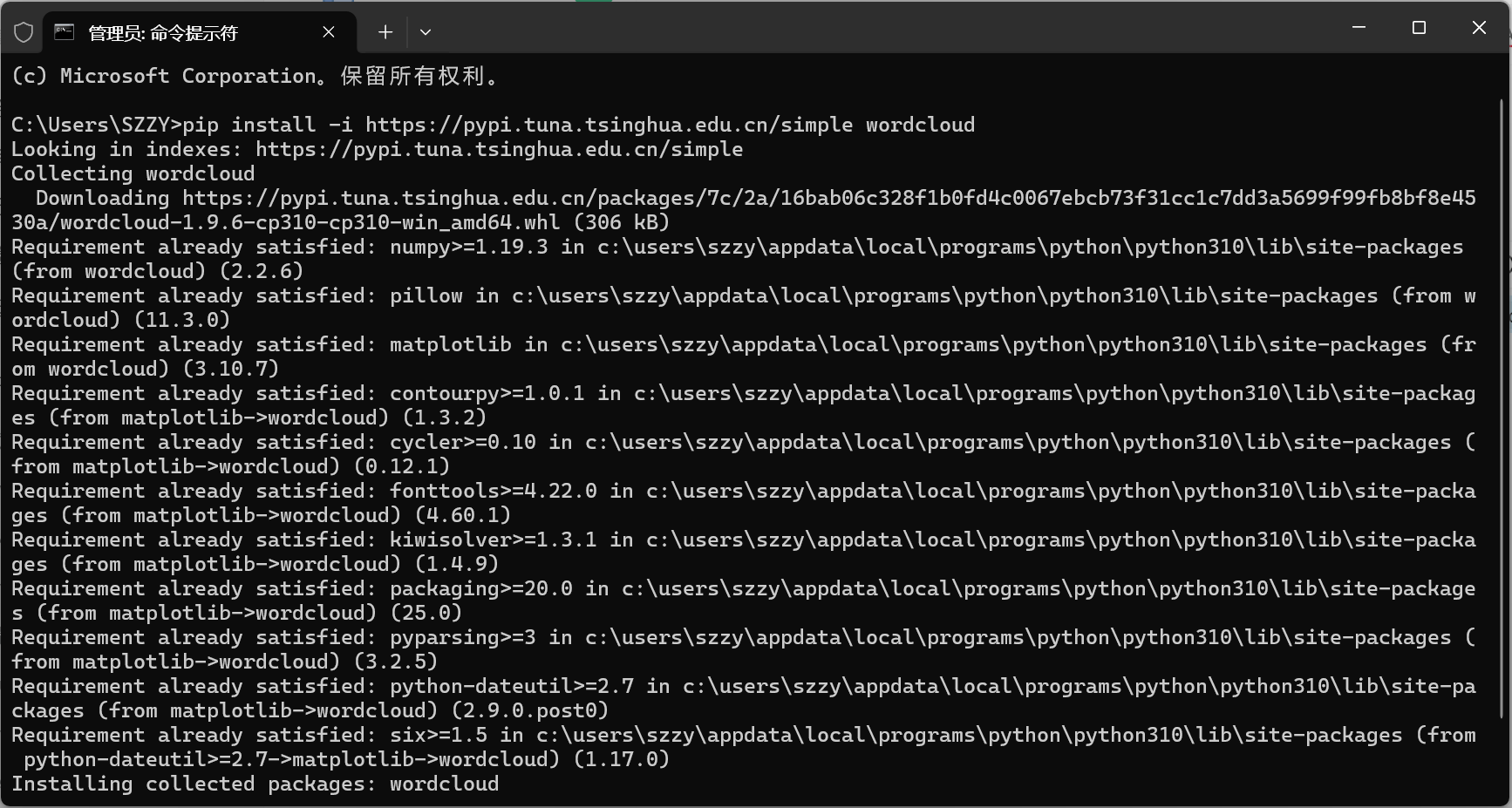
pip install wordcloud

指定镜像源:

pip install -i https://pypi.tuna.tsinghua.edu.cn/simple wordcloud

文档:https://amueller.github.io/word_cloud/index.html

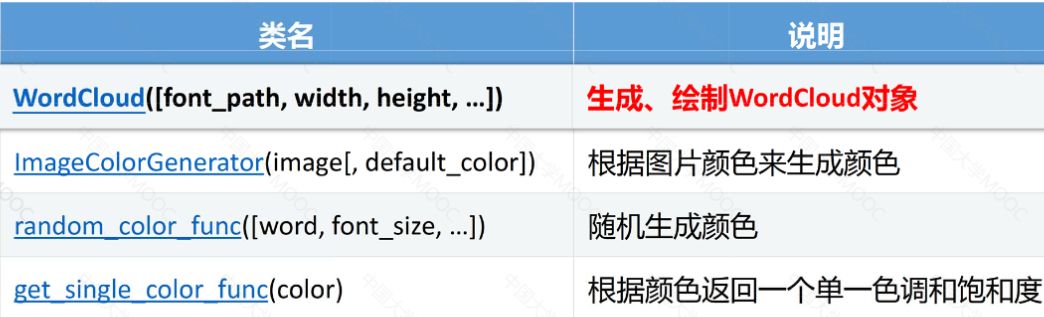
wordcloud.WordCloud()

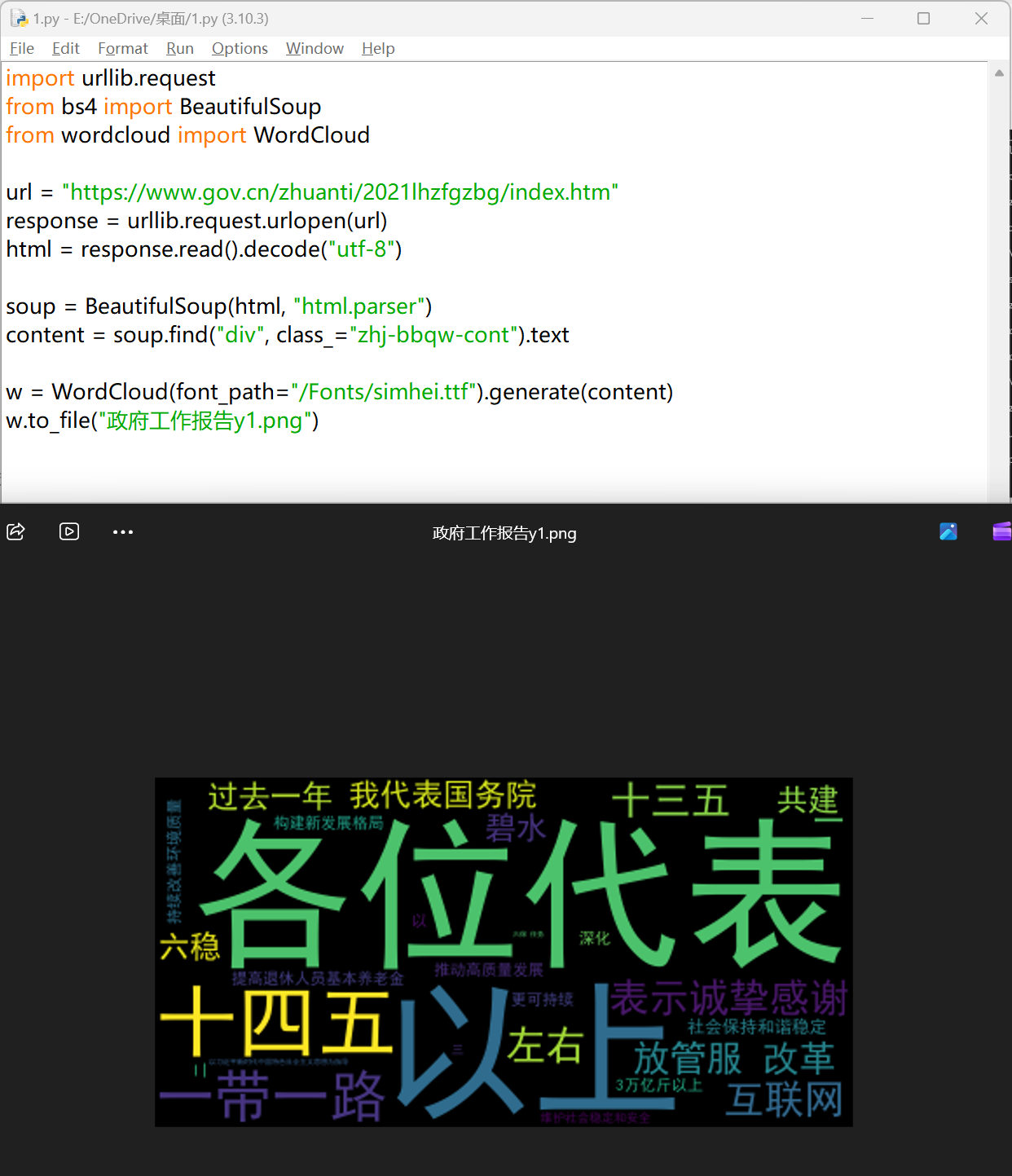
案例 1:”政府工作报告爬取与词云绘制“

python
 1
 2
 3
 4
 5
 6
 7
 8
 9
10
11
12
13
import urllib.request
from bs4 import BeautifulSoup
from wordcloud import WordCloud

url = "https://www.gov.cn/zhuanti/2021lhzfgzbg/index.htm"
response = urllib.request.urlopen(url)
html = response.read().decode("utf-8")

soup = BeautifulSoup(html, "html.parser")
content = soup.find("div", class_="zhj-bbqw-cont").text

w = WordCloud(font_path="/Fonts/simhei.ttf").generate(content)
w.to_file("政府工作报告y1.png")

简单词云绘制

算法流程

python
 1
 2
 3
 4
 5
 6
 7
 8
 9
10
11
12
13
14
15
16
17
18
#引入第三方库
import wordcloud
wordcloud.WordCloud().generate(text)
#另一种
from wordcloud import WordCloud
WordCloud().generate(text)

#预设一段文本
text = "Life is short, I use Python"

#读取文本文件
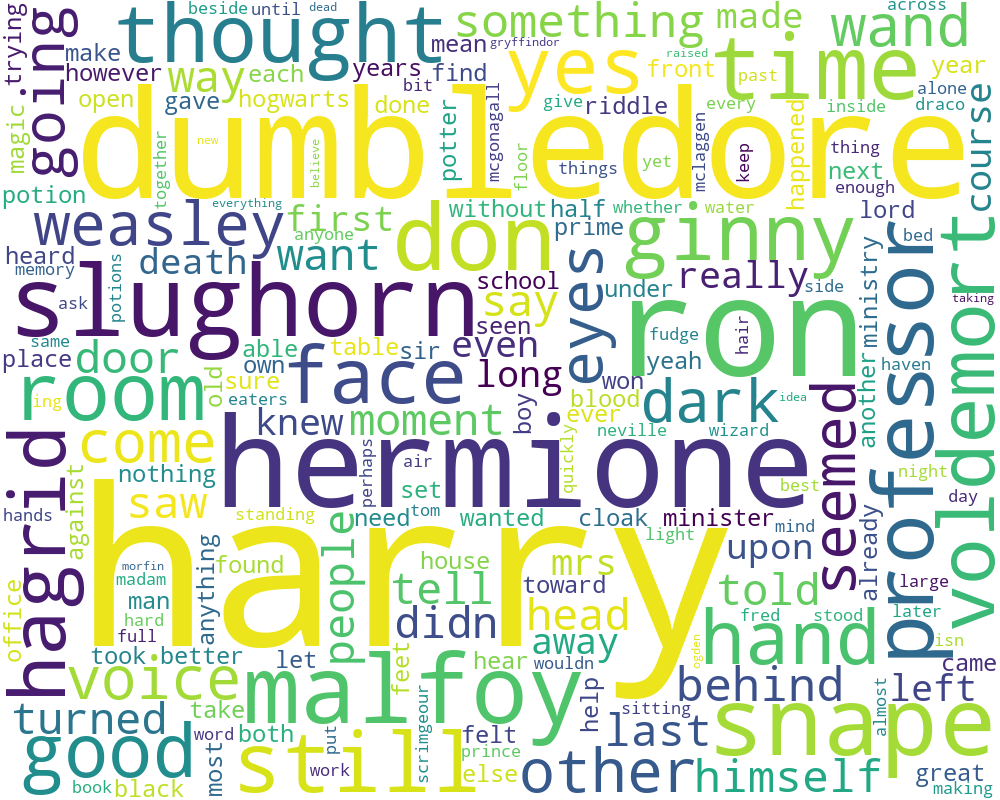
text = open('Harry Potter and The Half Blood Prince.txt').read()

#生成 text 对应的词云对象
w = WordCloud().generate(text)

#输出词云图像文件
w.to_file('filename')

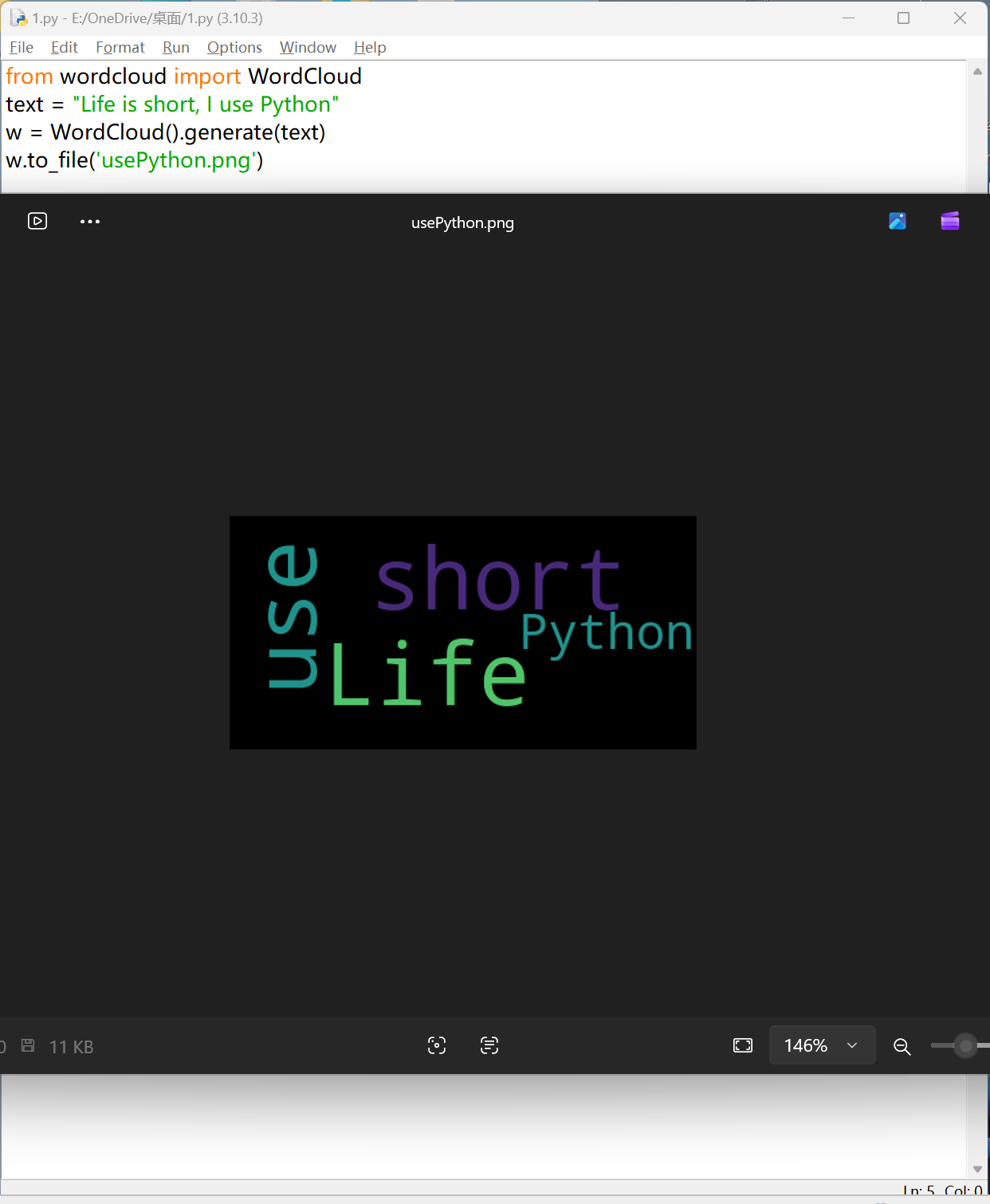
实例 1:英文词云

python
1
2
3
4
from wordcloud import WordCloud
text = "Life is short, I use Python"
w = WordCloud().generate(text)
w.to_file('usePython.png')

wordcloud 是如何将文本转化为词云呢?

  • 文本分词:默认以空格分隔各词
  • 词频统计:统计单词出现次数,并且初步过滤
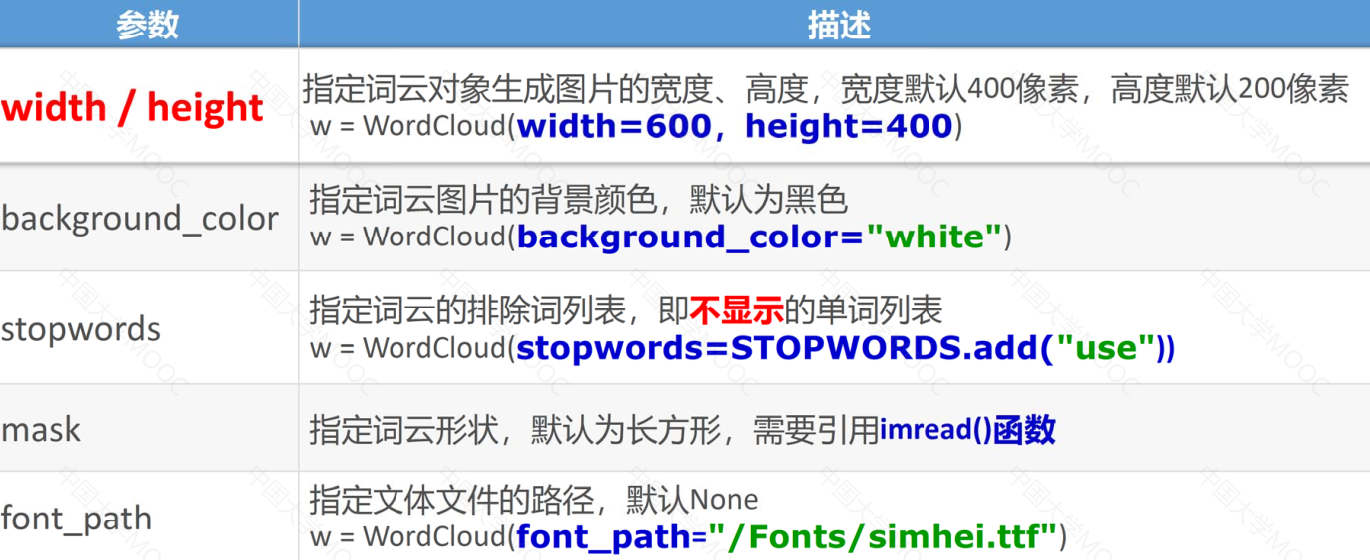
    • stopwords=set('dog')设置要去除的停用词。以字符串或者集合作为接收参数。如不设置将使用内置默认的停动词词库
  • 字号配置:根据词频进行字号配置
  • 云图布局:配置云图的颜色、字体、尺寸等

WordCloud 对象常用参数

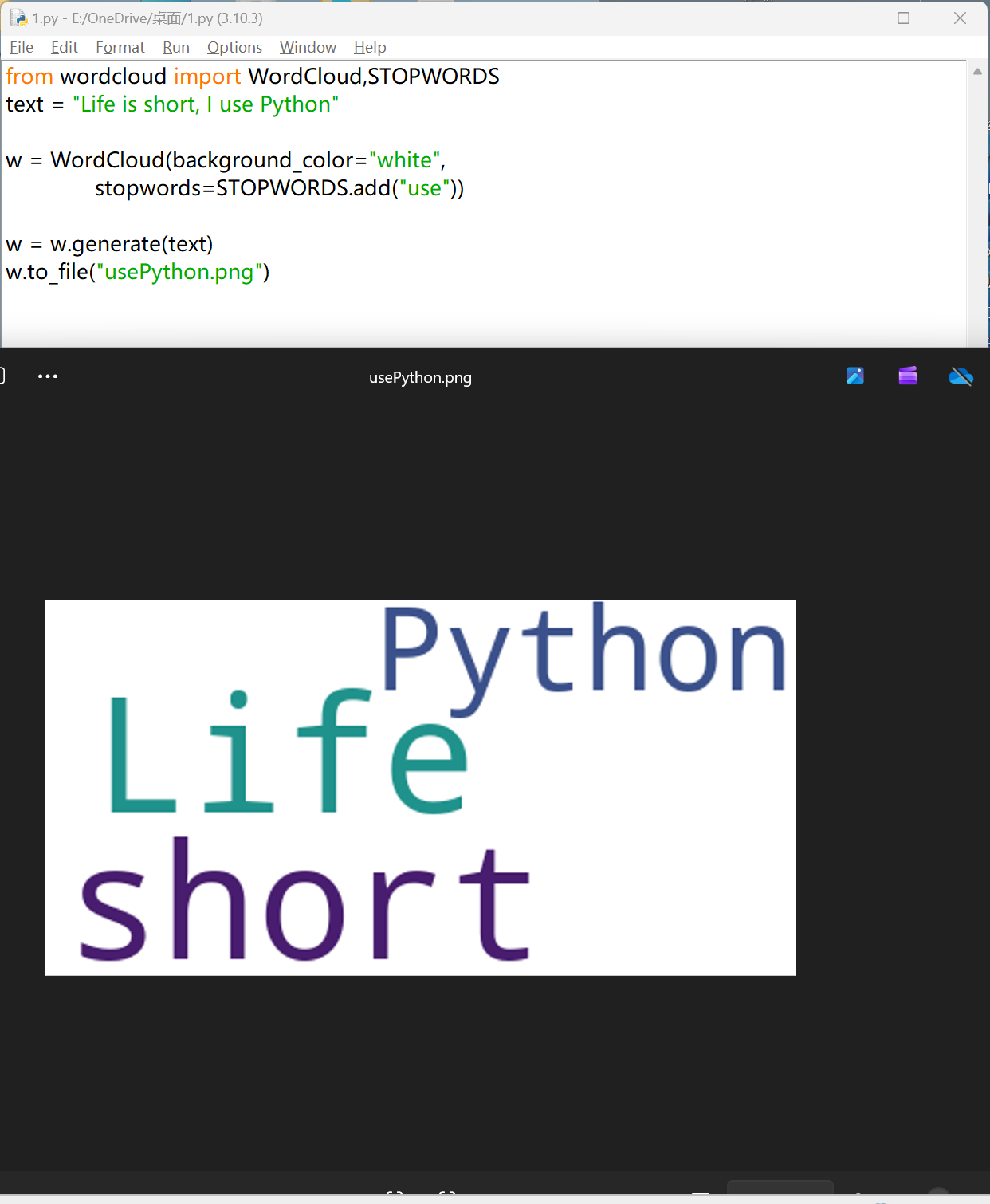
实例 2:英文词云-优化

python
1
2
3
4
5
6
7
8
from wordcloud import WordCloud,STOPWORDS
text = "Life is short, I use Python"

w = WordCloud(background_color="white",
              stopwords=STOPWORDS.add("use"))

w = w.generate(text)
w.to_file("usePython.png")

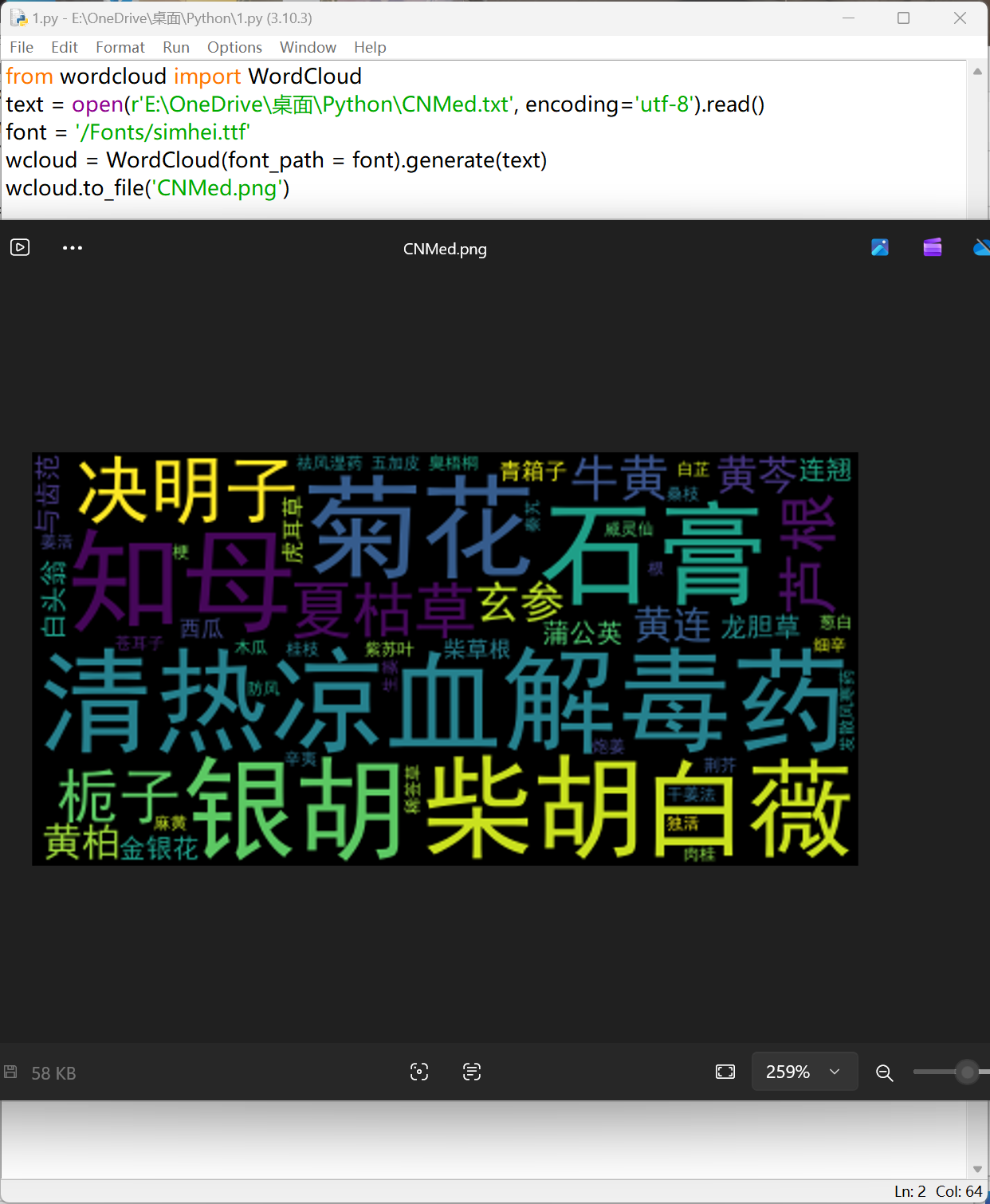
实例 3:中医药方词云绘制

CNMed.txt

python
1
2
3
4
清热凉血解毒药石膏菊花知母柴胡银胡白薇决明子夏枯草栀子芦根牛黄玄参黄芩
黄连黄柏龙胆草金银花连翘蒲公英白头翁与齿范柴草根青箱子西瓜虎耳草
祛风湿药姜活独活五加皮木瓜威灵仙白芷秦艽稀签草苍耳子桑枝臭梧桐
发散风寒药麻黄桂枝肉桂紫苏叶细辛防风荆芥生姜干姜法炮姜葱白辛夷
  • 中文字体显示问题
    • font_path指定文本文件的路径,默认 None
    • w = WordCloud(font_path="/Fonts/simhei.ttf")
python
1
2
3
4
5
from wordcloud import WordCloud
text = open(r'E:\OneDrive\桌面\Python\CNMed.txt', encoding='utf-8').read()
font = '/Fonts/simhei.ttf'
wcloud = WordCloud(font_path = font).generate(text)
wcloud.to_file('CNMed.png')

实例 4:政府工作报告词云绘制

python
 1
 2
 3
 4
 5
 6
 7
 8
 9
10
11
12
13
14
15
16
17
18
19
20
import urllib.request
from bs4 import BeautifulSoup
from wordcloud import WordCloud
from imageio import imread
import matplotlib.pyplot as plt

url = "https://www.gov.cn/zhuanti/2021lhzfgzbg/index.htm"
response = urllib.request.urlopen(url)
html = response.read().decode("utf-8")

soup = BeautifulSoup(html, "html.parser")
content = soup.find("div", class_="zhj-bbqw-cont").text

font = '/Fonts/simhei.ttf'
t = WordCloud(background_color = 'white', font_path = font, mask = im)
wcloud = t.generate(text)

plt.imshow(wcloud)
plt.axis("off")
plt.show()

词频统计

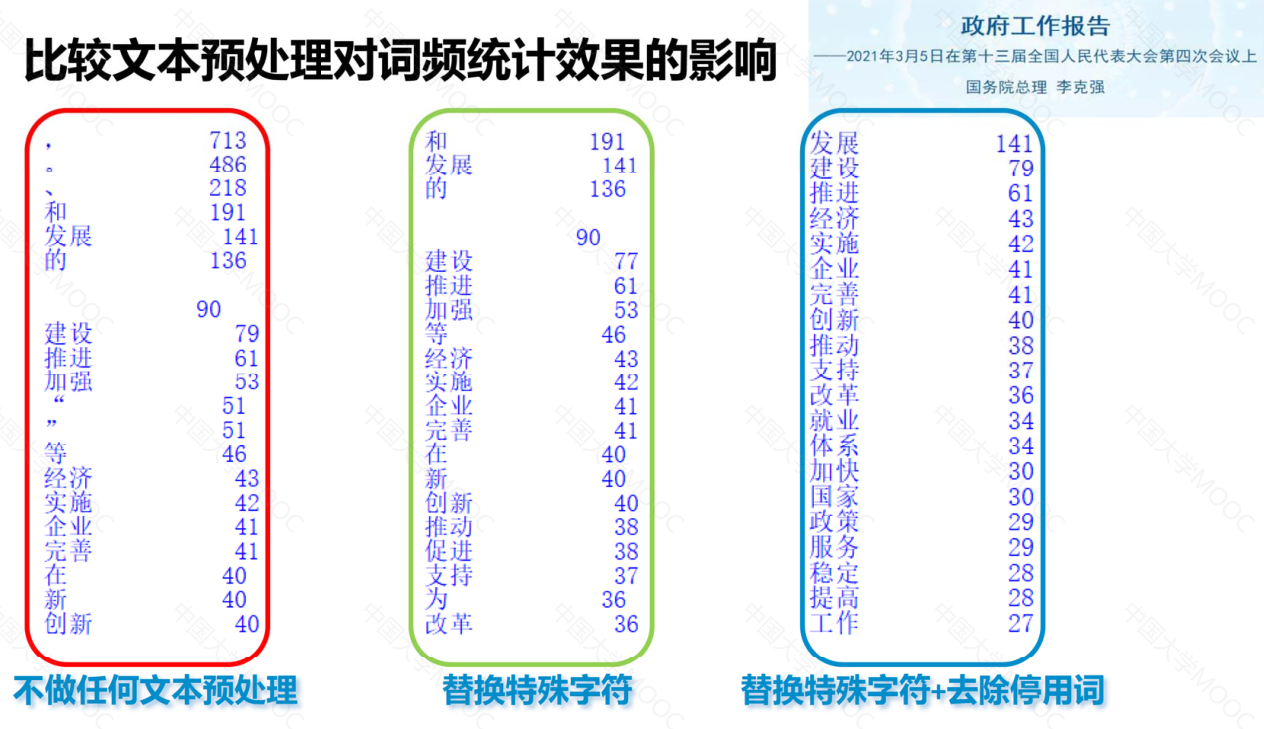
文本分词

将文本拆分成独立的字词以便于后续使用

wordcloud文本分词:默认以空格分隔各词

wordcloud词频统计:统计单词出现次数,初步过滤

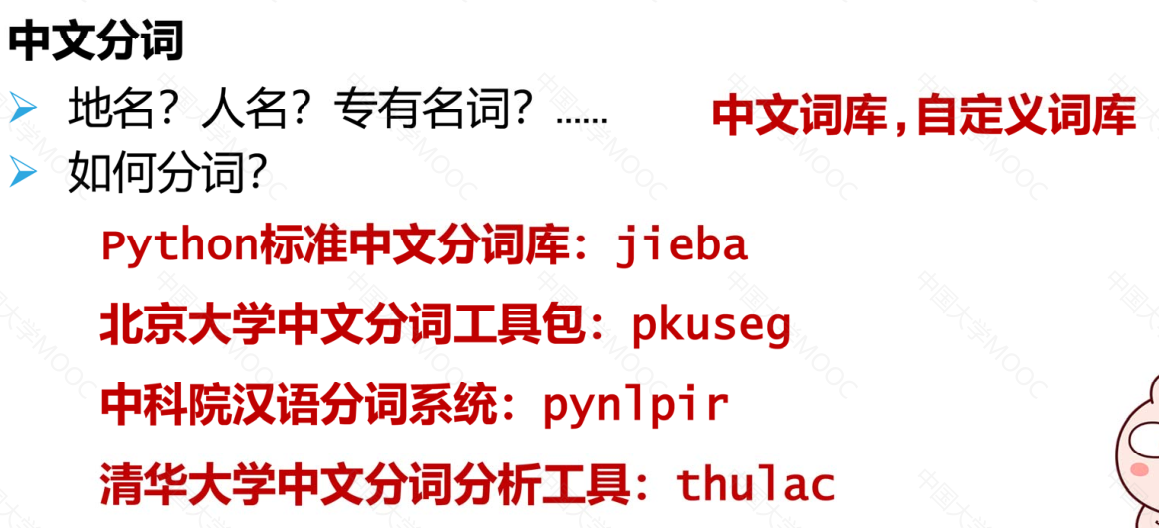
中文分词

案例

python
 1
 2
 3
 4
 5
 6
 7
 8
 9
10
11
12
13
14
15
16
17
18
19
20
21
22
23
24
25
26
27
28
29
30
31
32
33
34
35
36
37
38
39
40
41
42
43
44
45
46
47
48
49
50
51
52
53
54
55
56
57
58
59
60
61
62
63
64
65
66
67
68
69
70
71
72
73
74
75
76
77
78
79
import urllib.request
from bs4 import BeautifulSoup
from wordcloud import WordCloud
import matplotlib.pyplot as plt
import jieba

# ========================
# 1. 获取网页
# ========================
url = "https://www.gov.cn/zhuanti/2021lhzfgzbg/index.htm"
response = urllib.request.urlopen(url)
html = response.read().decode("utf-8")

# ========================
# 2. 解析网页正文
# ========================
soup = BeautifulSoup(html, "html.parser")
content_div = soup.find("div", class_="zhj-bbqw-cont")

if content_div is None:
    raise RuntimeError("未找到正文内容,请检查网页结构是否变化")

content = content_div.get_text()

# ========================
# 3. 文本清洗
# ========================
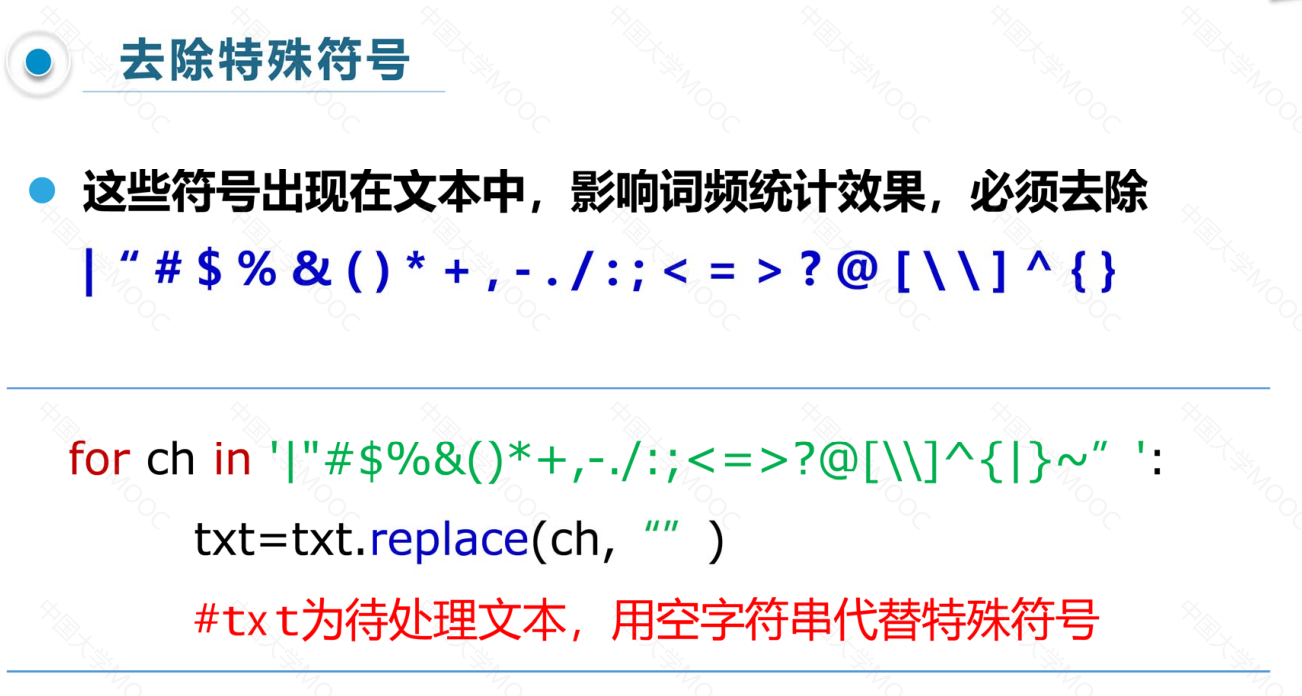
punctuation = ',。“”、:;()!——《》|#¥%$*+_./:;{}[]=-!@~`“'
for ch in punctuation:
    content = content.replace(ch, " ")

# ========================
# 4. 中文分词 + 停用词过滤
# ========================
stopwords = {
    "的", "和", "是", "在", "为", "等",
    "要", "以", "及", "对", "把", "着"
}

words = jieba.cut(content)

counts = {}
for word in words:
    word = word.strip()
    if not word or word in stopwords or len(word) == 1:
        continue
    counts[word] = counts.get(word, 0) + 1

# ========================
# 5. 输出 Top20 词频
# ========================
items = sorted(counts.items(), key=lambda x: x[1], reverse=True)

print("Top 20 关键词:")
for word, count in items[:20]:
    print(f"{word:<10} {count:>5}")

# ========================
# 6. 生成词云
# ========================
wc = WordCloud(
    font_path="C:/Windows/Fonts/simhei.ttf",  # 中文字体(必须)
    width=900,
    height=600,
    background_color="white",
    max_words=200,
    collocations=False  # 避免重复词组
)

wc.generate_from_frequencies(counts)

# ========================
# 7. 保存 + 显示
# ========================
wc.to_file("政府工作报告词云.png")

plt.imshow(wc)
plt.axis("off")
plt.show()

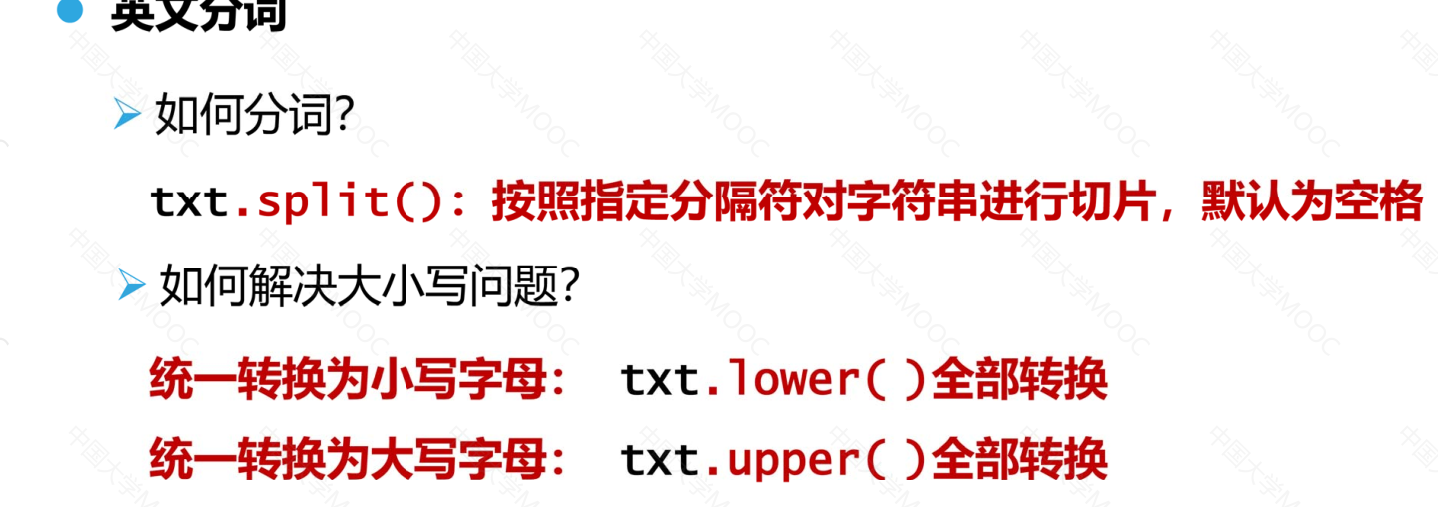
英文分词

案例

python
 1
 2
 3
 4
 5
 6
 7
 8
 9
10
11
12
13
14
15
16
17
18
19
20
21
22
23
24
25
26
27
28
29
30
31
32
33
34
35
36
37
38
39
40
41
42
43
44
45
46
47
48
49
50
51
52
53
54
55
56
57
58
59
60
61
62
63
64
65
66
67
68
69
70
71
72
73
74
75
76
77
78
79
80
81
82
83
84
85
86
87
88
89
90
91
92
93
94
95
96
97
98
99
from wordcloud import WordCloud
import matplotlib.pyplot as plt
import numpy as np
from PIL import Image

# ========================
# 1. 读取英文小说文件
# ========================
with open(
    "Harry Potter and The Half Blood Prince.txt",
    "r",
    encoding="utf-8",
    errors="ignore"
) as file:
    txt = file.read().lower()

# ========================
# 2. 文本清洗(英文标点)
# ========================
for ch in '~!@#$%^&*()_+`-=|{}:"><[]\\;,./?\'':
    txt = txt.replace(ch, " ")

# ========================
# 3. 英文分词
# ========================
words = txt.split()

# ========================
# 4. 停用词(英文)
# ========================
stopwords = {
    # 冠词
    "the", "a", "an",
    # 介词
    "in", "on", "at", "by", "for", "with", "from", "to", "into", "out", "of", "about", "above", "below", "before", "after", "between", "among", "through", "during", "over", "around", "down",
    # 连词
    "and", "but", "or", "so", "because", "since", "while", "if", "though", "although", "as", "than",
    # 代词
    "i", "me", "my", "mine", "you", "your", "yours", "he", "him", "his", "she", "her", "hers", "it", "its", "we", "us", "our", "ours", "they", "them", "their", "theirs", "this", "that", "these", "those", "who", "whom", "whose", "which", "what",
    # 助动词/系动词
    "am", "is", "are", "was", "were", "be", "been", "being", "have", "has", "had", "having", "do", "does", "did", "doing",
    # 情态动词
    "can", "could", "will", "would", "shall", "should", "may", "might", "must",
    # 副词/功能词
    "here", "there", "now", "then", "when", "where", "why", "how", "always", "never", "often", "sometimes", "just", "only", "very", "too", "quite", "rather", "well", "again",
    # 量词/填充词
    "all", "some", "any", "no", "none", "many", "much", "few", "little", "several", "one", "two", "three", "more",
    # 否定词
    "not", "no", "never",
    # 常见动词/口语词
    "know", "like", "think", "see", "got", "get", "go", "went",
    # 哈利波特文本高频无意义叙事词
    "said", "asked", "replied", "looked", "looking", "look", "back", "once", "right", "off"
}


# ========================
# 5. 词频统计
# ========================
counts = {}
for word in words:
    word = word.strip()
    if not word or word in stopwords or len(word) <= 2:
        continue
    counts[word] = counts.get(word, 0) + 1

# ========================
# 6. 输出 Top20
# ========================
items = sorted(counts.items(), key=lambda x: x[1], reverse=True)

print("Top 20 Words:")
for word, count in items[:20]:
    print(f"{word:<15} {count:>5}")


# ========================
# 8. 生成词云
# ========================
wc = WordCloud(
    width=1000,
    height=800,
    background_color="white",
    max_words=200,
    contour_width=2,
    contour_color="red",
    collocations=False
)

wc.generate_from_frequencies(counts)

# ========================
# 9. 保存 + 显示
# ========================
wc.to_file("HarryPotter_Heart_WordCloud.png")

plt.imshow(wc)
plt.axis("off")
plt.show()

词云绘制改进

python
 1
 2
 3
 4
 5
 6
 7
 8
 9
10
11
12
13
14
15
16
17
18
19
20
21
22
23
24
25
26
27
28
29
30
31
32
33
34
35
36
37
38
39
40
41
42
43
44
45
46
47
48
49
50
51
52
53
54
55
56
57
58
59
60
61
62
63
64
65
66
67
68
69
70
71
72
73
74
75
76
77
78
79
80
81
import urllib.request
from bs4 import BeautifulSoup
from wordcloud import WordCloud
import matplotlib.pyplot as plt
import jieba

# ========================
# 1. 获取网页
# ========================
url = "https://www.gov.cn/zhuanti/2021lhzfgzbg/index.htm"
response = urllib.request.urlopen(url)
html = response.read().decode("utf-8")

# ========================
# 2. 解析网页正文
# ========================
soup = BeautifulSoup(html, "html.parser")
content_div = soup.find("div", class_="zhj-bbqw-cont")

if content_div is None:
    raise RuntimeError("未找到正文内容,请检查网页结构是否变化")

content = content_div.get_text()

# ========================
# 3. 文本清洗
# ========================
punctuation = ',。“”、:;()!——《》|#¥%$*+_./:;{}[]=-!@~`“'
for ch in punctuation:
    content = content.replace(ch, " ")

# ========================
# 4. 中文分词 + 停用词过滤
# ========================
stopwords = {
    "的", "和", "是", "在", "为", "等",
    "要", "以", "及", "对", "把", "着"
}

words = jieba.cut(content)

counts = {}
for word in words:
    word = word.strip()
    if not word or word in stopwords or len(word) == 1:
        continue
    counts[word] = counts.get(word, 0) + 1

# ========================
# 5. 输出 Top20 词频
# ========================
items = sorted(counts.items(), key=lambda x: x[1], reverse=True)

print("Top 20 关键词:")
for word, count in items[:20]:
    print(f"{word:<10} {count:>5}")

# ========================
# 6. 生成词云
# ========================
wc = WordCloud(
    font_path="C:/Windows/Fonts/simhei.ttf",  # 中文字体(必须)
    width=900,
    height=600,
    background_color="white",
    max_words=200,
    collocations=False  # 避免重复词组
)

# wc.generate_from_frequencies(counts)
#wc = wc.fit_words(counts)


# ========================
# 7. 保存 + 显示
# ========================
wc.to_file("政府工作报告词云.png")

plt.imshow(wc)
plt.axis("off")
plt.show()